Monday, July 20, 2009

Comparing Database Monitors

When the next Beta of Foxhound is released (soon, soon), the SQL Anywhere Monitor will have some competition in the area of email alerts.

Here's how the two products compare as far as features are concerned:


Basic Features


SQL Anywhere MonitorFoxhound Database Monitor
Can monitor both SQL Anywhere and MobiLink servers.
Limited to monitoring SQL Anywhere target databases.
Limited to SQL Anywhere Version 11 target servers running Version 10 or 11 databases.
Can monitor Version 5, 6, 7, 8, 9, 10 and 11 databases and servers.
Multiple adjustable sampling intervals are supported, with a 10 second minimum. The defaults are 30 seconds, 5 minutes and 30 minutes for High, Medium and Low.
There's only one sampling interval, and it's fixed at 10 seconds.
Stores sample data in a dedicated Version 11 database.
Uses SQL Anywhere's built in HTTP server (port 4950) with an Adobe Flash browser interface.
Uses SQL Anywhere's built in HTTP server (port 80) with a standard HTML and JavaScript browser interface; e.g., select and copy to clipboard is supported.
Measurements shown via graphs that scroll to the right.
Measurements shown via text that scrolls up.
Separate tabs and graphs for separate measurements.
One combined display for all measurements.
- not supported -
Peak measurements are recorded, and measurements approaching the peaks are color highlighted.
- not supported -
Detailed measurements for each connection are displayed.
Basic information about each blocked connection is displayed: the connection numbers for the blocked and blocking connections.
Additional information about each blocked connection is displayed, including the SQL text for the blocked statement and for a SELECT statement you can run to find the locked row.
The GUI refresh interval defaults to 1 minute and cannot be set any faster than 30 seconds.
The GUI refresh interval is fixed at 10 seconds.
The GUI requires a login in addition to the user ids and passwords required to monitor to the target databases.
The Foxhound GUI itself requires no login... just the user ids and passwords for the target databases.
Detailed connection parameters (user id, password, host, server, database and/or port) must be provided for each target database.
ODBC DSNs may be chosen from the list of existing User and System DSNs. DSN-less connection strings may also be used.
Maintenance will be performed daily at [00] : [00]
The maintenance schedule is internally determined.
Scheduled backup via "Back up the SQL Anywhere Monitor data to the following directory: [ ]"
Backup is manual via desktop shortcut.
Yes/No: Take a daily average values older than [2 weeks] (or 1 week, 1 month, 6 months, 1 year)
- not supported -
Yes/No: Delete values older than [1 month] (or 1 week, 2 weeks, 6 months, 1 year)
Purge sample data: after 1 day, 1 week, 1 month, 1 year, never purge.
Yes/No: Delete old values when the total disk space becomes greater than (MB): [10240]
- not supported -
Yes/No: Allow anyone read-only access to the SQL Anywhere Monitor.
- not supported -


Alert Processing


SQL Anywhere MonitorFoxhound Database Monitor
Alerts are point-in-time events.
Alerts are conditions that go into and out of effect.
Detection of individual alert conditions can be enabled and disabled.
- not supported -
"All clear" messages are displayed and emails are sent when alerts are no longer in effect. Cancellation messages are also displayed when criteria change while alerts are in effect.
Alerts which are no longer in effect must be cleared manually via the "Mark Resolved" or "Delete" buttons.
Alerts are automatically cleared when the "all clear" and "cancelled" conditions are met.
Most alerts are issued as soon as the criteria are met.
A waiting period is part of the criteria for most alerts, with 10 samples being the most common default. The waiting period directly affects how long a condition must exist before an alert is issued, and indirectly affects how long the condition must remain resolved before an all clear is issued.
Alert messages are displayed on a separate tab.
Alerts and all clear messages are displayed in multiple locations and formats, both separate from and together with other measurements in the main monitor display.
Alerts will be repeatedly sent for a condition that persists, although the frequency can be controlled: Alerts for the same condition that occur with 5 minutes (the default) are suppressed. Other intervals may be chosen: 1 minute, 1 hour, 2 hours, 6 hours, 24 hours.
Alert messages are displayed and emails are sent ONLY when the alert goes into effect.
Can send alert emails via SMTP and MAPI.
SMTP only.
Sensible "factory setting" defaults are provided for all alert criteria.
Changes to alert criteria must be made manually for each database.
Manually-entered alert criteria may be copied from one database to another via "Save Settings as Default" and "Restore Default Settings"
- not supported -
The original Foxhound alert criteria may be restored via "Restore Factory Settings".
- not supported -
The "Use Extreme Settings" button may be used to force the detection of more alerts, sooner, for testing purposes.
Yes/No: Suppress unsubmitted error report alerts from resources.
- not supported -


Alert Conditions


SQL Anywhere MonitorFoxhound Database Monitor
(a) Availability Alert - Database Down
Alert #1. Foxhound has been unable to gather samples for [1m] or longer.
- not supported -
Alert #2. The heartbeat time has been [1.0s] or longer for [10] or more recent samples.
- not supported -
Alert #3. The sample time has been [10.0s] or longer for [10] or more recent samples.
(b) Alert when CPU use reaches [90] % for two collection intervals in a row.
Alert #4. The CPU time has been [90]% or more for [10] or more recent samples.
(c) Alert when memory usage reaches [85] % of the maximum cache size.
Alert #19. The cache has reached [100] % of its maximum size for [10] or more recent samples.
- not supported -
Alert #20. The cache satisfaction (hits/reads) has fallen to [50] % or lower for [10] or more recent samples.
(d) Alert when free disk space per dbspace is less than [1024] MB on the disk.
Alert #5. The free disk space on the drive holding the main database file has fallen below [1GB].
Alert #6. The free disk space on the drive holding the temporary file has fallen below [1GB].
Alert #7. The free disk space on the drive holding the transaction log file has fallen below [1GB].
Alert #8. The free disk space on one or more drives holding other database files has fallen below [1GB].
- not supported -
Alert #13. There are [1000] or more fragments in the main database file.
(e) Alert when a connection has been blocked for longer than [10] seconds.
Alert #23. The number of blocked connections has reached [10] or more during [10] or more recent samples.
- not supported -
Alert #24. At least one single connection has blocked [5] or more other connections during [10] or more recent samples.
- not supported -
Alert #25. The number of locks has reached [1,000,000] or more during [10] or more recent samples.
(f) Alert when the number of connections in use reaches [85] % of the license limit.
Alert #26. The number of connections has reached [1000] or more for [10] or more recent samples.
(g) Alert when a query has run for longer than [10] seconds.
- not supported -
- not supported -
Alert #27. The approximate CPU time has reached [25] % of elapsed time or more for at least one connection during [10] or more recent samples.
- not supported -
Alert #28. The transaction running time has reached [1m] or more for at least one connection during [10] or more recent samples.
- not supported -
Alert #21. The total temporary file space used by all connections has been [1G] or larger for [10] or more recent samples.
- not supported -
Alert #22. At least one single connection has used [500M] or more of temporary file space during [10] or more recent samples.
(h) Alert when a connection attempt fails.
- not supported -
(i) Alert when the arbiter or partner server is disconnected.
Alert #9. The high availability target database has become disconnected from the arbiter server.
Alert #10. The high availability target database has become disconnected from the partner database.
- not supported -
Alert #11. The high availability target database server has switched over to [server2].
- not supported -
Alert #12. The high availability target database has changed from [read only] to [updatable].
(j) Alert when the number of unscheduled requests reaches [5]
Alert #14. The number of requests waiting to be processed has reached [5] or more for [10] or more recent samples.
- not supported -
Alert #15. The current number of incomplete file I/O operations has reached [10] or more for [10] or more recent samples.
- not supported -
Alert #16. There have been [1000] or more disk and log I/O operations per second for [10] or more recent samples.
- not supported -
Alert #17. The Checkpoint Urgency has been [100] % or more for [10] or more recent samples.
- not supported -
Alert #18. The Recovery Urgency has been [1000] % or more for [10] or more recent samples.

Friday, July 17, 2009

Wall-E, meet RIVA


RIVA the robot may not match Wall-E's sparkling personality, or even IvanAnywhere's, but you can't fault her mission: To reduce medication errors at the Children's Hospital of Orange County in Southern California.

Plus, like IvanAnywhere, RIVA runs on SQL Anywhere:

"To make the code lean, RIVA relies heavily on scripts stored inside a Sybase Inc. embedded database, SQL Anywhere."
- Thom Doherty, CTO at Intelligent Hospital Systems
Read more about RIVA here, and watch the video here.

Wednesday, July 15, 2009

Danger! NULLs!

It's legal to avoid taxes, but not to evade them. With NULLs, I don't care, I will avoid them, evade them, whatever it takes.

Like Al Gore does with global warming, whenever something bad happens I blame the NULLs.

And here's why: The code I posted in SELECT FROM Excel Spreadsheets was wrong! Because of NULLs!

Well, because of a stupid mistake *I* made involving NULLs. And it isn't really the NULLs' fault. Not really.

Here's the query that was wrong; can you see why?

SELECT proxy_browsers.browser          AS brand_name,
SUM ( proxy_browsers.hits ) AS hit_count,
hit_count / total_hits * 100.0 AS percent
FROM proxy_browsers
CROSS JOIN ( SELECT SUM ( hits ) AS total_hits
FROM proxy_browsers )
AS summary
WHERE browser IS NOT NULL
GROUP BY proxy_browsers.browser,
summary.total_hits
ORDER BY hit_count DESC;

And this is the most embarrassing part: I knew there was someting wrong, because that query gave a different answer from this one which used an OLAP WINDOW instead of a CROSS JOIN:
SELECT DISTINCT 
FIRST_VALUE ( browser ) OVER ( brand_window ) AS brand_name,
SUM ( hits ) OVER ( brand_window ) AS hit_count,
CAST ( hit_count
/ SUM ( hits ) OVER ( everything )
* 100.0 AS DECIMAL ( 11, 4 ) ) AS percent
FROM proxy_browsers
WHERE browser IS NOT NULL
WINDOW brand_window AS ( PARTITION BY browser ),
everything AS ()
ORDER BY hit_count DESC;

But I thought it was the OLAP query giving the wrong answer, not the CROSS JOIN! I didn't post the OLAP query because I thought there was a bug in SQL Anywhere 11!

Arrgh!

What's the answer? Last chance, the contest is closed...

Scroll down to see the answer...

down...

down...

down...

down...

down...

down...

down...

down...

down...

down...

down...

down...

down...

There are two SELECTs in the CROSS JOIN query but only one of them has the necessary WHERE browser IS NOT NULL. Here's the corrected CROSS JOIN query, which now returns the same result set as the (always correct) OLAP version:
SELECT proxy_browsers.browser          AS brand_name,
SUM ( proxy_browsers.hits ) AS hit_count,
hit_count / total_hits * 100.0 AS percent
FROM proxy_browsers
CROSS JOIN ( SELECT SUM ( hits ) AS total_hits
FROM proxy_browsers
WHERE browser IS NOT NULL )
AS summary
WHERE browser IS NOT NULL
GROUP BY proxy_browsers.browser,
summary.total_hits
ORDER BY hit_count DESC;

Jonathan's the clear winner in the Find The Mistake Contest; not only did he provide right answer, but he proposed an alternative solution:

Clearly you're anticipating the possibility that the "browser" column may be null, based on the "browser is not null" clause in the outer query. But your inner query that generates the total hits doesn't include this clause, which means that you're measuring percentages against the total number of hits, not the total of hits from non-null browsers.

This may or may not be considered a bug, depending on what you're trying to present. But if you have hits from null browsers, then your percentages will not sum to 100, and at a minimum this will look odd.

Fix is obviously to add "where browser is not null" to the subquery. A perhaps better fix would be to handle the null values, something like this:
SELECT coalesce(proxy_browsers.browser, 'Unknown') AS brand_name,
SUM ( proxy_browsers.hits ) AS hit_count,
hit_count / total_hits * 100.0 AS percent
FROM proxy_browsers
CROSS JOIN ( SELECT SUM ( hits ) AS total_hits
FROM proxy_browsers )
AS summary
GROUP BY brand_name,
summary.total_hits
ORDER BY hit_count DESC;

Monday, July 13, 2009

Techwave Agenda

This year's Techwave Symposium in Washington DC may be a shadow of former Techwaves, but it's not all bad.

First, there's the price, $200 for a day and a half of technical content, and then there's the content itself: The agenda for the SQL Anywhere and MobiLink sessions has just been published and it looks solid.

Oh, and registration is now open.

Friday, July 10, 2009

Search this blog, plus Glenn Paulley's

      ...search this blog, plus Glenn Paulley's

I've added Glenn Paulley's blog to the Google Custom Search Engine gadget at the top right of this page, and here's why:
  • It's the Number One most popular SQL Anywhere blog, plus

  • Glenn has recently increased the number of code-related posts.
November 9, 1995
Yes, actual code! Which makes searching both blogs at the same time a good idea when you're looking for SQL Anywhere technical topics.

Wednesday, July 8, 2009

Is It Safe?

That's a simple question made memorable by the 1976 movie Marathon Man:

Christian Szell: Is it safe?... Is it safe?
Babe Levy: You're talking to me?
Christian Szell: Is it safe?
Babe Levy: Is what safe?
Christian Szell: Is it safe?
Babe Levy: I don't know what you mean. I can't tell you something's safe or not, unless I know specifically what you're talking about.
Christian Szell: Is it safe?
Babe Levy: Tell me what the "it" refers to.
Christian Szell: Is it safe?
Babe Levy: Yes, it's safe, it's very safe, it's so safe you wouldn't believe it.
Christian Szell: Is it safe?
Babe Levy: No. It's not safe, it's... very dangerous, be careful.
In my case, the question was this:
Is it safe to call GET_IDENTITY ( 'table-name', 0 )?
The SQL Anywhere function call GET_IDENTITY ( 't', 1 ) pre-allocates the next value that would normally be assigned by an INSERT statement to the DEFAULT AUTOINCREMENT column in t, and returns that value to the caller. This is very useful if you need to know what a new AUTOINCREMENT primary key is going to be, before you INSERT the row.

You can pass GET_IDENTITY other numbers, like 2, 3, ..., to have it pre-allocate multiple values and return you the first value.

The Help doesn't talk about passing it zero, but that's what I wanted it to do: Just tell me what the next value is going to be, but don't pre-allocate it... let the next INSERT use it.

Actually, what I really wanted was the last value assigned, which I could get by subtracting:

GET_IDENTITY ( 'table-name', 0 ) - 1

In other words, give me the current AUTOINCREMENT value, the one that was last assigned to some particular table. This is different from @@IDENTITY in two ways:
  • @@IDENTITY returns the last AUTOINCREMENT value assigned to any table, whereas GET_IDENTITY() lets you specify which table.

  • @@IDENTITY only returns values assigned by the current connection, whereas GET_IDENTITY() doesn't care what connection made the assignment. In other words, @@IDENTITY remembers the last value assigned by the current connection, whereas GET_IDENTITY() will return values assigned by other connections.
That last point is one you should consider carefully. If it's important to you, you may be better off calling GET_IDENTITY ( 't', 1 ) before doing the INSERT, because the value that is pre-allocated by GET_IDENTITY ( 't', 1 ) is protected from work done by other connections, and you are safe to specify it in the INSERT.

However, you may be looking for a faster alternative to SELECT MAX ( t.c ), which may be slow because:
  • there's no index on the DEFAULT AUTOINCREMENT column, or

  • there's an index but it's not useful because the DEFAULT AUTOINCREMENT column is not the first column.
It turns out that yes, it is safe to call GET_IDENTITY with zero in the second argument. Here's some code that shows how GET_IDENTITY ( 'table-name', 0 ) - 1 returns the same value as SELECT MAX ( t.c ):

CREATE TABLE t ( c INTEGER DEFAULT AUTOINCREMENT );

SELECT GET_IDENTITY ( 't', 0 ) - 1,
MAX ( t.c )
FROM t;

INSERT t VALUES ( DEFAULT );

SELECT GET_IDENTITY ( 't', 0 ) - 1,
MAX ( t.c )
FROM t;

INSERT t VALUES ( DEFAULT );

SELECT GET_IDENTITY ( 't', 0 ) - 1,
MAX ( t.c )
FROM t;

Here are the three result sets; note that the first SELECT returns NULLs because there are no rows in t yet:

GET_IDENTITY('t',0)-1,MAX(t.c)
(NULL),(NULL)

GET_IDENTITY('t',0)-1,MAX(t.c)
1,1

GET_IDENTITY('t',0)-1,MAX(t.c)
2,2

Monday, July 6, 2009

Foxhound Sends Email Alerts

Fans of Foxhound will appreciate that the next beta of the database monitor will be getting "Email Alerts".

That's where you tell Foxhound what worries you the most about your SQL Anywhere server, and Foxhound tells you when your worst fears come true.

By email.

Like when your database goes offline.

Or the CPU goes above 90% for an hour.

Or when fifty users can't get any work done because their database connections are all blocked.

Here's an example of an alert email:


It's been surprisingly difficult to implement email alerts in a useful way; there's more to it than detecting anomalies and sending emails:

  • Letting the administrator specify criteria for each different alert condition.

  • Specifying how soon to actually issue an alert after the condition is first detected.

  • Deciding how soon to issue an "all clear" after the condition is no longer detected.

  • Deciding what to do when the administrator changes the criteria while an alert is in effect.

  • Displaying the alerts and all clears on the Database Monitor page, when email isn't enough.

  • Displaying an error message when Foxhound can't send an email.

  • Doing all this without making the administrator fill in endless forms.
Here's an example of an alert, followed by an all clear, displayed on the Foxhound Database Monitor page:

Wednesday, June 17, 2009

Techwave Symposium, Men In Black Edition

The first 2009 Techwave Symposium is going to be held on August 26 and 27, 2009 at the Renaissance Mayflower Hotel in Washington DC... a real bargain at $200, plus a discounted hotel rate of $149 per night.

Plus this: "vertical content specifically designed for mid-level and senior level IT staff from civilian agencies, intelligence agencies and the Department of Defense"... will the "Special Event" will be an alien abduction foiled by black helicopters?

Wednesday, May 6, 2009

Is SQL Anywhere Cool?

It's not that hard to get into the ServerFault beta...

[ "How hard can it be, they let you in?" says DoppelGanger ]
...all you need is 100 reputation points in StackOverflow and then follow the instructions on this page.
[ "And it's really easy to get 100 points on StackOverflow, isn't it?" ]
OK, here's why I think ServerFault's gonna be a huge success, just like StackOverflow: it's already got useful content. In fact, it's got the answer to the first question I wanted to ask.
[ "It's better than that, isn't it? It already had the first answer you were going to post, didn't it?" ]
Yes, that's right... I had a question, and I didn't look it up on ServerFault, I thought I would find the answer elsewhere first and post both question and answer, as my first working experience with ServerFault.

So I went and wasted a bunch of time, finally found the poorly indexed Microsoft KB page (it didn't include the message text I was getting), applied the fix, then went over to ServerFault to post the answer... and this is what I saw as soon as I started the "Ask a question" dialog:


My question was "How do I fix "MMC could not create the snap-in" in Windows?", and when ServerFault popped the list of "Related Questions" the very first one was an exact match: "MMC could not create the snap-in".

And yes, the answer was exactly the same as the one I was going to post. I'm guessing it didn't show up earlier in my Google searches because StackOverflow's still in beta.


When I wrote StackOverflow and ServerFault Are The Future I wondered if a site devoted to "people who manage or maintain computers in a professional capacity" would be suitable for asking questions about database servers. The answer is yes, ServerFault already has 34 questions tagged "sqlserver" and 15 tagged "mysql" in the first week of beta.

That means if your SQL Anywhere question is about writing application code that talks to the server, or writing SQL code that runs on the server, then StackOverflow is the place to be, but if you question is about, say, setting up a High Availability configuration, or backing up your 100GB database, then ServerFault is the place.

The question now is, "Will anyone go there, to ask and answer questions about SQL Anywhere?"

More specifically, "Will iAnywhere Solutions staff go there?" ...the vast majority of questions on the NNTP newsgroups are answered by iAnywhere tech support, professional services and engineering folks. Without them, asking a SQL Anywhere question on StackOverflow and ServerFault will be like asking a COBOL question... an experience in loneliness.

Maybe THAT'S the question: "Is SQL Anywhere cool? Or is it COBOL?"

Monday, May 4, 2009

Image Preview in ISQL

Here's a sweet new feature in SQL Anywhere 11 that didn't make it into the "What's New" section (or anywhere else) in the Help: Image Preview in dbisql.

The following SELECT includes a LONG BINARY column holding JPEG images. In Version 10 dbisql it shows up as "0xffd8ffe000104a46..." but in Version 11 it appears as "(IMAGE)":


Select one of the (IMAGE) cells and click on the "..." ellipsis button, and you get this:


Like I said, sweet! Sure beats zero-ex-eff-eff-dee-eight-blah-blah-blah...

Sunday, May 3, 2009

StackOverflow and ServerFault Are The Future


Going out on a limb here: the StackOverflow and ServerFault websites are the future for finding answers to your questions about SQL Anywhere. The first site is for programming questions, including SQL, and the second site will be for "system administrator" questions so that will cover system setup, peformance and tuning and so on.

At least, I hope that last part's right... ServerFault is currently in beta, and no, I'm not in the beta; I can't even get access to the FAQ. But it's from the same folks who gave us StackOverflow so it's probably not vaporware.

Folks who read my earlier rant about StackOverflow may be surprised at my new position. The truth is, even as I was writing that article, I knew that I'd be back. I knew that StackOverflow was so much better than all the alternatives that my negative opinions meant very little... ok, they meant nothing.

I knew that eventually I'd suck it up and return to StackOverflow.

So here I am, having just watched Joel Spolsky's Google video Learning from StackOverflow.com, all excited again...


You don't need to know anything about StackOverflow to watch the video, but you will know all about it by the time it's over.

If you're already familiar with StackOverflow, it's still worth watching; you'll learn all sortsa stuff that isn't in the FAQ:

  • In its first 8 months of operation StackOverflow has reached about 30% of the world's English-speaking professional programmers.

  • Joel is most proud of the fact that answers to new questions appear right away.

  • He is least proud of the common practice of closing off questions that are off-topic without having a place to send people. The user community is too focussed on the purity of the home page, and off-topic questions are jumped on in ways that are not friendly to newbies. Also, edit wars are recognized as being an ongoing problem.

  • The observation that "people are really good at tagging their questions" surprised me... and makes me much more optimistic about StackOverflow's future. It might have something to do with the fact that while StackOverflow's user interface works well for professionals it probably wouldn't work well for the general public; i.e., a StackOverflow for "gardeners" might work, but not one for "gardening".

  • StackOverflow is place of choice for questions about new technology; e.g., it's the number one resource for iPhone programming. New technology users tend to organize around a StackOverflow tag. SQL Anywhere may have been around for years but it's "new technology" too: web services and clients, built-in HTTP server, XML, JSON, PHP and C# stored procedures, and so on.

  • The badges you earn in StackOverflow are Napoleonic in nature: "A soldier will fight long and hard for a bit of colored ribbon."

  • The search facility isn't very good; it uses SQL Server. No surprise there, but it's kinda moot: the majority of StackOverflow hits come from Google search.

  • The StackOverflow organization: four people, two servers. No mention of backup, sure hope it's not another Ma.gnolia waiting to happen.

  • Future possibilities include lots and lots of vertical StackOverflows; e.g., StackOverflow for tax accountants. Also: StackOverflow for recruiting.

  • People have asked about licensing the software to large corporations, and although "in the long run it completely makes sense", they don't have the resources to do anything about it right now.

  • ServerFault will be up "in a couple of weeks" ...which might mean "any day now", now. If StackOverflow is any indication, ServerFault will be useful from Day One.

  • On the subject of program maintenance: There is nothing you can do to a large, working software product that is worse than deciding to simply start over and rewrite it from scratch. Examples include Netscape and Perl 6.
Why am I so interested in StackOverflow and ServerFault? Because for all sorts of reasons NNTP is doomed, and if the public SQL Anywhere Q&A process is going to survive it has to move to the web. Today. Not a year from now, not six months from now.

It has to move to a modern website, one that works well, one that's popular, one that's fast and Google-searchable.

Today.

Thursday, April 30, 2009

Another Reason To Use 4K Pages

Folks who don't (or aren't allowed to) use port 119 NNTP client software such as Forte Agent to browse the SQL Anywhere newsgroups at forums.sybase.com, and who also refuse (like I do) to use the execrable web interface to those newsgroups, are really missing out on some valuable content.

Such as the occasional reply by Ivan Bowman. Here's a recent example:


If the database page size is smaller than 4K (the O/S page size), then sequential scans will also allocate two 64K contiguous buffers to perform hinting (DiskReadHint / DiskReadHintPages). With page sizes larger than 2K, contiguous allocations are not needed on Win32 (scattered reads are used reading into non-contiguous pages in the cache). It is more efficient to use scatter reads because the data does not need to be moved from the contiguous buffer to the cache pages, and also larger hints can be performed (up to 16M instead of 64K). For this reason among others, I would try to use 4K pages or larger unless there is a compelling reason not to do so.

The problem could show up with query plans that use a number of sequential scans. Parallel execution plans could make this more likely to cause a problem because they could have up to 8 (in your case, 2xquad core) times as many sequential scans active.

Ivan T. Bowman
SQL Anywhere Research and Development
[Sybase iAnywhere]
If Ivan had a blog (he doesn't, as far as I know) it would be one of the best... he knows what he's talking about, AND he knows how to write to be understood, a killer combination in this age of twitterilliteracy.

If Ivan had a blog, it would surely be one of the Featured Few on the Sybase Blog Center web page... well, maybe, maybe not, who knows how those choices are made...

...but I can guarantee it would have a place of honor on right here, in the "FOCUSING ON SQL ANYWHERE..." list over to the right.

If Ivan had a blog, that is.

Wednesday, April 29, 2009

Sometimes It's The Little Things That Count (4)

"Have you seen this?" asked my colleague, pointing to the little "Copy example" icon in the HTML Help for SQL Anywhere:


Well, yes, of course I'd seen it, I'm into the Help all the time... I just hadn't noticed the fact that you can now copy sample code without having to select the text first.

...and better yet, without losing the fixed-format layout:


I'm not sure when the Copy example icon was introduced, but I suspect it came with version 11.0.0... and it's on the DocCommentXchange website as well as in the Help file.

"Hey, cool!" I replied.

Tuesday, April 28, 2009

Alex Gorbatchev's SyntaxHighlighter

NOTE: This post was edited on July 30, 2010. Scroll to the bottom to see where the JavaScript code was corrected to change the <script ... /> tags to <script ... ></script> tag pairs.

Regular readers might have noticed something new in the previous article: the appearance of a cute little code display gadget that does syntax highlighting:

server1config.txt

# server1config.txt

# server options

-n server1
-o server1\server1log.txt
-su sql
-x tcpip(port=55501;dobroadcast=no)
-xf server1\server1state.txt

# database options

server1\demo.db
-sm secondarydemo
-sn primarydemo
-xp partner=(eng=server2;links=tcpip(host=localhost;port=55502;timeout=1));mode=sync;auth=dJCnj8nUx3Lijoa8;arbiter=(eng=arbiter;links=tcpip(host=localhost;port=55500;timeout=1))
Actually, I didn't care about syntax highlighting, and you don't see any color highlighting in the example above because it's using the "straight text" format. What I wanted was automatic numbering so I could refer to individual lines when explaining the tricky bits. Plus copy-and-paste that left out the line numbers and any other decorations.

OK, the truth: I was jealous of the code display gadget Glenn Paulley uses.

What I got was even better: No horizontal scrolling!

I didn't know I didn't want horizontal scrolling, Glenn had to explain why: if he posts a long code sample you have to scroll vertically to even see the horizontal scroll bar, and by the time you get down there the wide lines that extend off to the right might have already scrolled off the screen entirely. Now, you can't see how far you need to scroll horizontally.

Like I said, I didn't know I didn't want it. What I got instead of horizontal scrolling was a little green arrow that shows where line wrapping starts. To see how it really shines, make the browser window really narrow, you'll see something like this:


The gadget comes with four icons at the top right, with mouseover text reading "view source", "copy to clipboard", "print" and "?" respectively.

The "view source" icon displays the code in a popup window with scrolling instead of wrapping:


The "copy to clipboard" icon does exactly that, with confirmation:


The "print" icon does a nice job, with lines numbered and wrapped to fit the page:


The "?" produces a "Help - About" window with a link to the docs:


Another thing to like about SyntaxHighlighter: its robustness. I certainly didn't expect it to work on the 141K 4491-line DDL script produced by the SQL Anywhere Version 11 dbunload.exe utility when run against the demo database.

But work it did... eventually... after I pressed Continue on this dialog box and let it finish:


Here's the proof, a snapshot from a test using blogger:


Here's how to use SyntaxHighlighter in your web page or blog:

1. Paste the setup code ahead of the </HEAD> tag in your HTML or page template; for contexts other than blogger, remove the line "SyntaxHighlighter.config.bloggerMode = true;":


<link href='http://alexgorbatchev.com/pub/sh/2.0.296/styles/shCore.css' rel='stylesheet' type='text/css'/>
<link href='http://alexgorbatchev.com/pub/sh/2.0.296/styles/shThemeDefault.css' rel='stylesheet' type='text/css'/>
<script src='http://alexgorbatchev.com/pub/sh/2.0.296/scripts/shCore.js' type='text/javascript'></script>
<script src='http://alexgorbatchev.com/pub/sh/2.0.296/scripts/shBrushJScript.js' type='text/javascript'></script>
<script src='http://alexgorbatchev.com/pub/sh/2.0.296/scripts/shBrushBash.js' type='text/javascript'></script>
<script src='http://alexgorbatchev.com/pub/sh/2.0.296/scripts/shBrushCpp.js' type='text/javascript'></script>
<script src='http://alexgorbatchev.com/pub/sh/2.0.296/scripts/shBrushSql.js' type='text/javascript'></script>
<script src='http://alexgorbatchev.com/pub/sh/2.0.296/scripts/shBrushPlain.js' type='text/javascript'></script>
<script type='text/javascript'>
SyntaxHighlighter.config.bloggerMode = true;
SyntaxHighlighter.config.clipboardSwf = 'http://alexgorbatchev.com/pub/sh/2.0.296/scripts/clipboard.swf';
SyntaxHighlighter.all();
</script>

NOTE: On July 30, 2010 the code above was corrected to change the <script ... /> tags to <script ... ></script> tag pairs.

2: Use the <PRE> tag to display your code using whatever syntax or "brush" you want (see the the docs for a description of the brushes and instructions about customizing the setup):

<pre>
Orginal pre tags still work.
</pre>

<pre class="brush: sql">
SELECT * FROM dummy;
</pre>

<pre class="brush: text">
Ordinary text.
</pre>


Enhancements? Here's a couple of low priority nice-to-haves, just quibbles in my opinion:

1. Optional vertical scrolling with a setting for how many lines to display. If that was provided, then horizontal-scrolling-as-an-option might also be of interest.

2. Better logic for the "sql" brush. Personally I don't care about color highlighting at all, but some people do, and the SQL highlighting is rather, um, less than perfect.

The funny thing is, the docs say this about the plain text brush: "Maybe somebody will need it :)" In actual fact, it's the only brush I need, and it's by far the fastest for rendering: no waiting at all to see all 4491 lines of reload.sql when I use <pre class="brush: text">.


If you use Alex Gorbatchev's Syntax Highlighter on your own blog or website, make a donation... I did!

Friday, April 24, 2009

Demonstrating High Availability

See High Availability Demo, Revised

Note 1: This article was edited on August 17, 2010, and so was the read-me file in the download, to fix the following two file names: 1_setup_HA.bat and 2_start_HA.bat.

Note 2: This article was edited on October 22, 2013 to update the download link. If you have any problems downloading the file, contact breck.carter@gmail.com.


Quick Start

1. If you don't already have SQL Anywhere 11 installed, download the Developer Edition.

2. Download demo HA V11 single machine.zip into c:\temp.

3. Unzip it using this password: rjOdagvFCChOXrfb

4. Run these Windows command files...
1_setup_HA.bat
   2_start_HA.bat
   3_connect_HA.bat
5. See $readme.txt for more things to do.

My previous post mentioned...

The World's Fastest Simplest And Most Complete 
                   End-to-End 
                 Single-Machine 
                Demonstration Of 
         SQL Anywhere High Availability
... and here it is. But first, this disclaimer:

Except for the purposes of teaching, learning and giving demonstrations, I can see no justification whatsoever for using fewer than three physically separate computers to implement SQL Anywhere High Availability: two computers for the two copies of the database and a third to run the arbiter.

It's hard enough to eliminate all single points of failure; by putting two servers on one computer absolutely guarantees that one exists.

Having said that, this article is all about the "teaching, learning and giving demonstrations"... and studying the behavior of a running High Availability (HA) setup. Not to mention getting practice getting the (somewhat funky) command line parameters right.

Let's plunge right in: Part 1 shows how to run the demo, followed by Part 2 which explains the bits and pieces.

Oops, one last thing...

The Assumptions

  • This demo has been written for Windows.

  • It assumes you have SQL Anywhere 11 installed; you can download the Developer Edition here.

  • The demo also makes a copy of the standard "demo database"... which in turn assumes that database has been installed in the default location:
    C:\Documents and Settings\All Users\Documents\SQL Anywhere 11\Samples\demo.db

  • This article does not assume you have a clue about SQL Anywhere High Availability, but if you don't, reading Part 1 might feel a bit like watching Pulp Fiction for the first time: the material's out of order, and the explanations don't come until Part 2.

    Or, you can read ahead in this overview of HA.

Part 1: Running The Single-Machine HA Demo

The first step is to download this zip file from SkyDrive.com:
demo HA V11 single machine.zip

The second step is to unzip it into a new folder, say c:\temp. The password for unzipping is rjOdagvFCChOXrfb ...the file's encrypted for all sorts of reasons: your safety, my sanity, passage through firewalls and so on.

The third step is to run these Windows command (batch) files, one after the other...
1_create_HA.bat
   2_start_HA.bat
   3_connect_HA.bat
Each file PAUSEs when it's done.

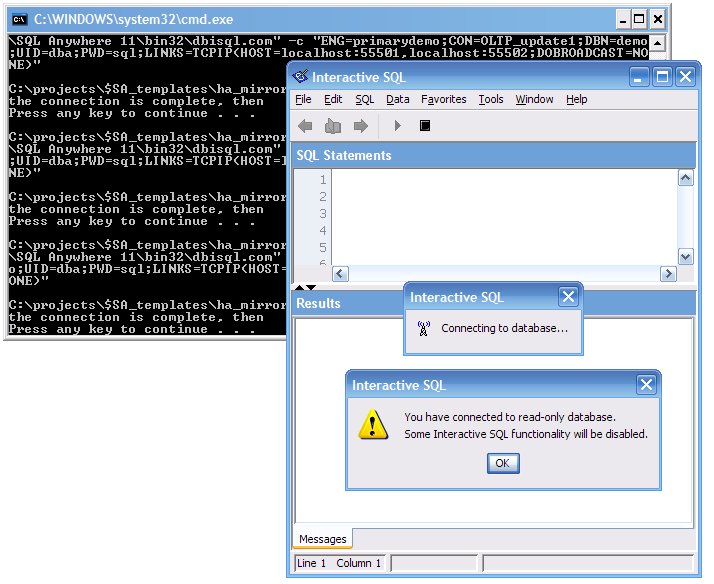
The third file also PAUSEs several times to give dbisql.com time to start up and get consecutive SQL Anywhere connection numbers assigned to each session. When each dbisql session appears on the screen you will have to switch back to the DOS command window to "Press any key to continue..."


Along the way you will see this warning appear twice: "You have connected to a read-only database." That means two of the four dbisql sessions are connected to the secondary database, a new feature in SQL Anywhere version 11:


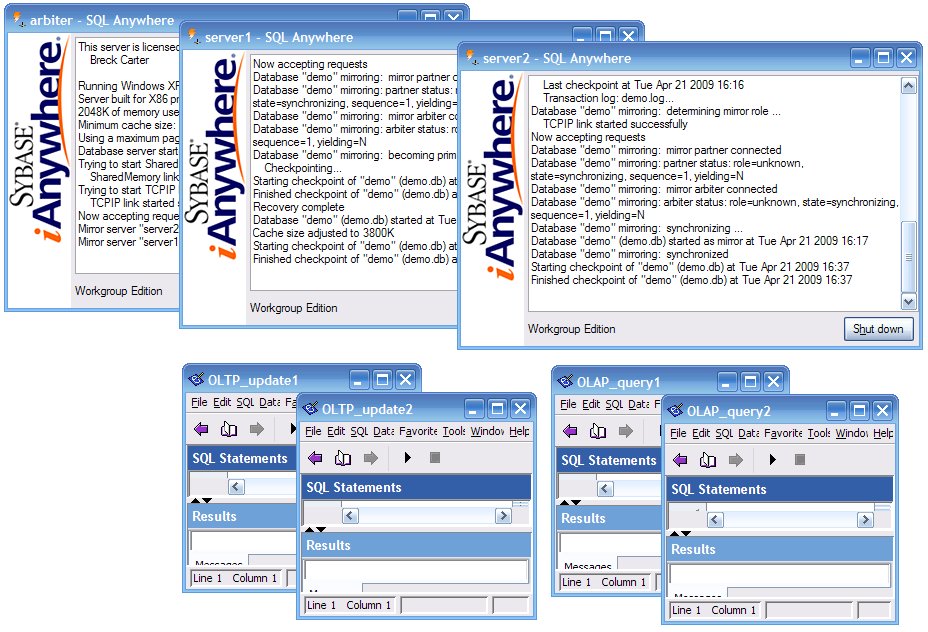
If everything goes normally, you should now have 7 windows open: three SQL Anywhere servers and four dbisql sessions:


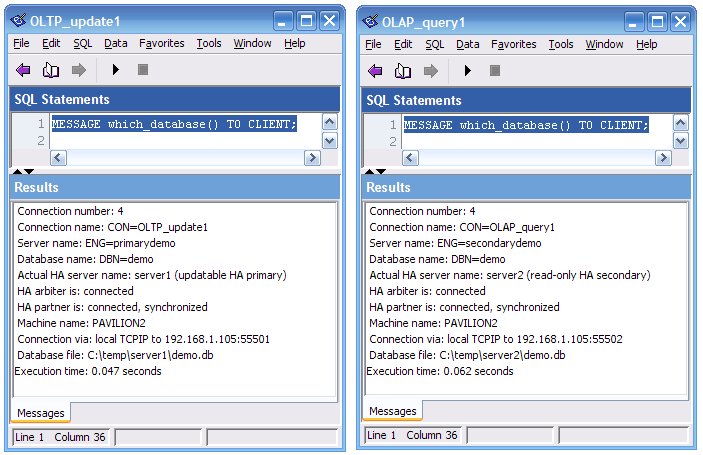
To see which database each dbisql session is connected to, run this script:

4_show_which_database.sql
MESSAGE which_database() TO CLIENT;
Here you can see that the OLTP_update1 session is connected to ENG=primarydemo and that the database file is C:\temp\server1\demo.db, whereas the OLAP_query1 session is connected to ENG=secondarydemo and that the database is in a different subfolder: C:\temp\server2\demo.db:


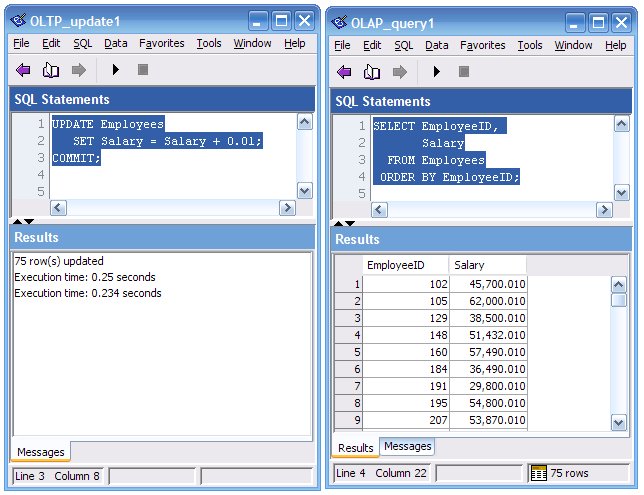
To see mirroring in action, run this UPDATE script in OLTP_update1...

5_update_primary.sql
UPDATE Employees
   SET Salary = Salary + 0.01;
COMMIT;
...then run this SELECT in the read-only OLAP_query1 session:

6_select_from_secondary.sql
SELECT EmployeeID, Salary
  FROM Employees
 ORDER BY EmployeeID;
With SQL Anywhere High Availability, by the time the COMMIT finishes in OLTP_update1 the modified data is already available in the secondary database for display in OLAP_query1:


To see failover in action, open up the "server1" database console window and click on the "Shut down" button, then re-execute the 4_show_which_database.sql script in the two dbisql sessions:
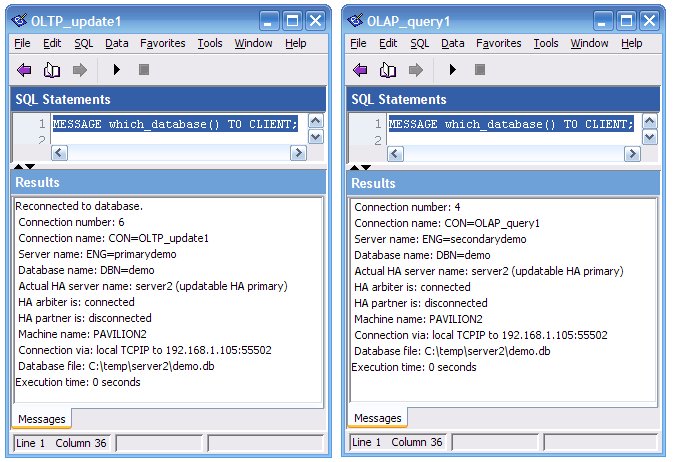


Now you see the ENG= server names are still the same (primarydemo and secondarydemo) but the "Actual HA server name" values are the same: server2. That happened when the arbiter and server2 got together and decided that since server1 was missing in action, server2 should assume the role of primary database server.

Plus, somewhere along the line, wonderful new (to me) functionality was added to dbisql.com to automatically reconnect when the original primary server goes walkabout. That's something you might have to add to your client applications if you want the failover process hidden from your users:

The fact that the formerly read-only OLAP_query1 session is now connected to an updatable database is interesting; you can read about my personal voyage of discovery from "It's a bug!" to "It's a feature!" in my previous post The Watcom Restatement.

Some final points:
  • The download includes a $readme.txt file with point-form instructions.

  • If you want to restart any of the servers you've stopped (arbiter, server1 and/or server2) just re-execute 2_start_HA.bat... it will start anything that isn't running, and the High Availability setup will be restored to full health.

  • To clean up after the demo's done, close the dbisql windows and run 0_stop_delete_HA.bat. It will stop all three servers and then delete the subfolders and files that were created during the demo.

Is that all there is?

Q: Is that all there is to setting up High Availability?

A: Yes, that's pretty much it.

If you're like me, at this point you're feeling a sense of wonderment and awe... not at the demo per se but at the speed and simplicity of SQL Anywhere High Availability.

Q: Is that all there is, or are there more features?

A: The Help says it best in Benefits of database mirroring:
  • When an arbiter is present, failover from primary to mirror is automatic. If you are running in synchronous mode, no committed transactions are lost during failover.

  • Failover is very fast because the mirror server has already applied the transaction log. When the mirror detects that the primary has failed, it rolls back any uncommitted transactions and then makes the database available.

  • No special hardware, such as a shared disk is required.

  • No special software (for clustering, for example) is required.

  • No particular operating system version is required.

  • The servers do not need to be located near each other geographically. In fact, locating them far apart provides additional protection against disasters such as fire.

  • Database servers in a mirroring system can also be used to run other databases.
Plus, in Version 11 read-only access to the secondary server was added.

Q: Is that all there is to running a demo?

A: No, of course not. You can show what happens when you restart server1... pretty much nothing as far as the clients are concerned, but if you look at the database server windows you'll see messages from the new secondary server1 "Database "demo" mirroring: synchronized" and from the primary server2 "mirror partner connected".

You can show what happens when you stop the arbiter... again, pretty much nothing if server1 and server2 are both still running.

You can show what happens when you restart the arbiter... again, nothing affecting the clients.

Then stop server2... another failover, back to the new primary server1. But that only helps OLTP_update1, it can reconnect to the new primary server. OLAP_query1 can't connect at all because there is no secondary server running. It could stay connected to a database if it changes from secondary to primary, but it cannot make a new connection to a primary database because it is explicitly requesting a connection to the secondary server:
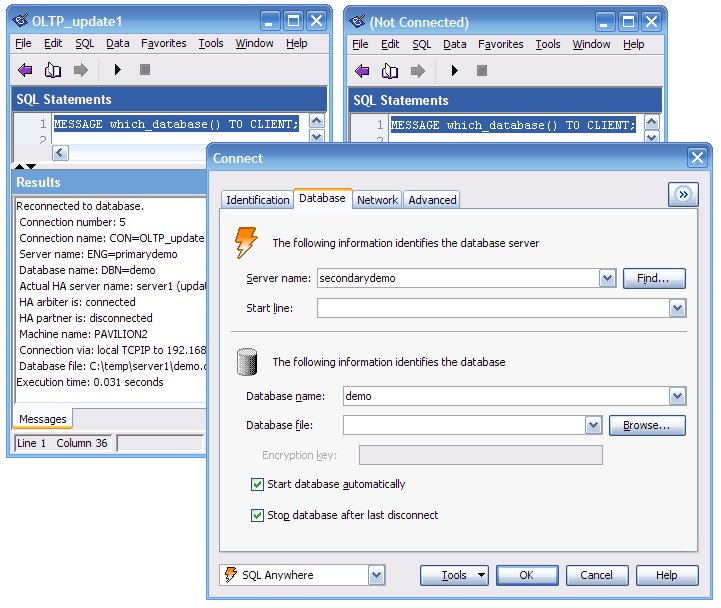


Think that's deep? Try stopping two servers at once, then restarting one, or two. Stop all three, start them in different orders, watch connections.

Then switch to using three machines, and instead of stopping engines just pull network cables one at a time... all three engines might be running but they can't all talk to one another, and for all intents and purposes that's the same as a server crash... but which server?

Enough! This is a single-machine demo, on to Part 2.

Part 2: How The Single-Machine HA Demo Works

Here's the terminology used in this article; some of it agrees with The Official Documentation, some of it doesn't, and the differences are clearly noted:
  • SQL Anywhere High Availability - A configuration of three network servers (dbsrv11.exe), called the primary, secondary and arbiter, which uses TCP/IP to communicate among the servers, to ship transaction log information from the primary server to the secondary server in order to maintain two copies of the same database, and to provide rapid failover of client connections from the primary to secondary server in case of an outage.

  • Database Mirroring - Another term for High Availability, not used in this article.

  • primary server - The database server which currently has the role of accepting update-capable client connections and of continuously sending transaction log data to the secondary server.

  • secondary server - The database server which currently has the role of accepting read-only client connections and of continuously applying transaction log data received from the primary server.

  • mirror server - Another term for secondary server, not used in this article.

  • partner server - The "other" database server; e.g., the secondary server when viewed from the primary, and vice versa. This term is important when discussing command line options but is not otherwise used here.

  • outage - When two (or more) servers can't communicate with one another. It may or not mean a server has stopped or crashed, it could be a failure of network communications between the servers.

  • confusion - The state folks often enter at this point... the vague definition of "outage" is at fault, but "quorum" usually gets the blame.

  • quorum - The requirement that at least two of the three servers must be able to communicate with each other, and for those servers to agree which server should be primary, for database availability to continue. There are two mutually exclusive definitions of quorum:
    1. The primary server has continuous communication with at least one other server (arbiter or secondary), and that other server agrees the primary should maintain its role as primary, or

    2. in the event of an outage the secondary server has communication with the arbiter and obtains agreement from the arbiter for it to assume the role of primary.
    If quorum switches from definition 1 to definition 2, failover occurs. If quorum is completely lost, so are all the client connections, until quorum is reestablished.

  • failover - When the secondary server assumes the role of primary and begins accepting update-capable client connections because it has quorum but cannot communicate with the (previous) primary. If the previous primary server is still running, it drops all client connections. Throughout this process quorum is maintained: first, it switches from definition 1 to definition 2 because of the outage, and then after failover it returns to definition 1.

  • arbiter server - The third server, the one that's needed for determining if failover must occur. The arbiter server doesn't have a copy of the database.

  • role switch - Another term for failover, not used in this article.

  • server1 - The unchanging dbsrv11 -n name used in this article to refer to one of the actual servers, which at any given time can be acting as the primary server or the secondary server.

  • server2 - The unchanging dbsrv11 -n name for the other actual server. When server1 is the primary server then server2 is the secondary server, and vice versa.

    Note: This usage of "server1" and "server2" does not appear in The Official Documentation, but I think it should. Folks need to give real names to real servers, and the words "primary" and "secondary" don't work for that purpose.

  • primarydemo - The dbsrv11 -sn name used in this article for SQL Anywhere connection strings used to make client connections to the current primary server: ENG=primarydemo

  • secondarydemo - The dbsrv11 -sm name used in this article for SQL Anywhere connection strings used to make client connections to the current secondary server: ENG=secondarydemo
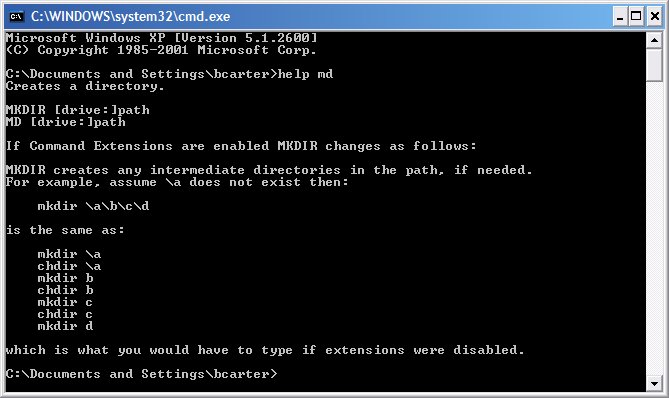
The following sections describe each of the Windows command and SQL Anywhere configuration files line by line. For more information about Windows command syntax you can use the Windows help command; e.g., start - Run... - cmd, and then type "help md":


1_create_HA.bat
REM Create the subfolders...

MD arbiter
MD server1
MD server2

REM Put the database and log together in server1...

CD server1
COPY "C:\Documents and Settings\All Users\Documents\SQL Anywhere 11\Samples\demo.db" 
COPY "C:\Documents and Settings\All Users\Documents\SQL Anywhere 11\Samples\demo.log" 
"%SQLANY11%\bin32\dblog.exe" -t demo.log demo.db 
CD ..

REM Prepare the database for use...

"%SQLANY11%\bin32\dbspawn.exe" -f "%SQLANY11%\bin32\dbeng11.exe" -n temp server1\demo.db
"%SQLANY11%\bin32\dbisql.com" -c "ENG=temp;DBN=demo;UID=dba;PWD=sql" READ additional_DDL.sql
"%SQLANY11%\bin32\dbstop.exe" -y -c "ENG=temp;UID=dba;PWD=sql"

REM Copy the database and log to server2...

copy server1\demo.db  server2
copy server1\demo.log server2

PAUSE All done
Lines 3 to 5 create temporary subfolders for the three servers: arbiter, primary and secondary.

Line 10 copies the standard demo database to the server1 subfolder.

Lines 11 and 12 are included for extra safety... line 11 copies the corresponding transaction log file if it exists (it might not), and line 12 makes sure that the demo.db file contains the correct location of the demo.log file.

Lines 17 through 19 start the demo database, apply the additional_DDL.sql script and then shut down the database so it can be copied.

Lines 23 and 24 copy the demo database and transaction log to the server2 folder; now there are two copies of the database, all ready to go.

Line 26 is optional; to streamline your demo just delete the final PAUSE command from each of the command files. However, you may want the command windows to stay on the screen rather than disappearing as soon as the commands are all done, so you can talk about what just happened.

2_start_HA.bat
REM Start the servers...

"%SQLANY11%\bin32\dbspawn.exe" -f "%SQLANY11%\bin32\dbsrv11.exe" @arbiterconfig.txt
"%SQLANY11%\bin32\dbspawn.exe" -f "%SQLANY11%\bin32\dbsrv11.exe" @server1config.txt
"%SQLANY11%\bin32\dbspawn.exe" -f "%SQLANY11%\bin32\dbsrv11.exe" @server2config.txt 

PAUSE All done
Lines 3 through 5 start the three servers arbiter, server1 and server2. The dbspawn.exe utility is used so the command file will keep running after each dbsrv11.exe command is executed, rather than waiting for dbsrv11.exe to finish (which it won't, not until that server is shut down).

The special "@filespec" notation is used for specifying where the dbsrv11.exe command options are located: in a text file instead of on the command line. That's done because High Availability requires some funky, er, interesting options, and the command lines become wayyyyyy too long if you try to code everything there.

The three configuration files are described in detail later.

Note that it's always safe to run 2_start_HA.bat even if one or more of the servers are already running. If a server's already running it will just display this error message and carry on with the next command:
SQL Anywhere Start Server In Background Utility Version 11.0.1.2052
DBSPAWN ERROR:  -81
Invalid database server command line
3_connect_HA.bat
SETLOCAL
SET MORE=DBN=demo;UID=dba;PWD=sql;LINKS=TCPIP(HOST=localhost:55501,localhost:55502;DOBROADCAST=NONE)

"%SQLANY11%\bin32\dbisql.com" -c "ENG=primarydemo;CON=OLTP_update1;%MORE%"

PAUSE Wait until the connection is complete, then

"%SQLANY11%\bin32\dbisql.com" -c "ENG=primarydemo;CON=OLTP_update2;%MORE%"

PAUSE Wait until the connection is complete, then

"%SQLANY11%\bin32\dbisql.com" -c "ENG=secondarydemo;CON=OLAP_query1;%MORE%"

PAUSE Wait until the connection is complete, then

"%SQLANY11%\bin32\dbisql.com" -c "ENG=secondarydemo;CON=OLAP_query2;%MORE%"

PAUSE All done
Lines 1 and 2 set up a local environment variable for later use as a simple shortcut. %MORE% returns those parts of the -c connection strings that don't change from one dbisql.com command line to the next.
  • DBN=demo;UID=dba;PWD=sql; - The database name, user id and password, all standard connection string parameters.

  • LINKS=TCPIP(...) - For ease of reconnecting after a failover, SQL Anywhere lets you provide multiple HOST addresses.

  • HOST=localhost:55501,localhost:55502; - If the first host:port address combination doesn't work, SQL Anywhere will try connecting on the second one. For example, if dbisql is trying to connect to the secondary database, and that happens to be the database running on server2 at localhost:55502, then the first address won't work but the second one will. In a multiple-machine demo, this is where you would specify actual IP addresses or domain names or machine names instead of localhost... and maybe not have to specify the port at all.

  • DOBROADCAST=NONE - This is the TCP/IP equivalent of waving a dead chicken over the keyboard to eliminate bad luck. DOBROADCAST=NONE tells SQL Anywhere not to depart from the exact HOST addresses specified here. If both addresses fail then so does the connection, and there is no chance that some other magic default or implied address will be used. This option is probably not required at all, but... it does not hurt. "High Availability" sometimes goes hand-in-hand with "sophisticated network setup" and that's where DOBROADCAST=NONE has often proven to be useful.
Line 4 starts the first dbisql session and connects it to the primary database. The connection parameter CON=OLTP_update1 assigns a name to the connection; this is useful because the value appears in the title bar of the dbisql session as well as being available at runtime via the CONNECTION_PROPERTY ( 'Name' ).

Line 8 starts the second dbisql session connected to the primary, and lines 12 and 16 start sessions connected to the secondary.

Lines 6, 10 and 14 aren't really necessary, but for the purposes of giving demonstrations it's sometimes nice to know in advance which dbisql session is going to get which SQL Anywhere connection number assigned: 4, 5, etc. Without these PAUSE commands, different dbisql.com commands sometimes finish in an order different from the command lines in this script.

This article doesn't actually make use of all four dbisql sessions, they're just there for more complex scenarios. To streamline your demo, just delete lines 8 through 11 and lines 14 through 17.

arbiterconfig.txt
# arbiterconfig.txt

-n arbiter 
-o arbiter\arbiterlog.txt 
-su sql 
-x tcpip(port=55500) 
-xa auth=dJCnj8nUx3Lijoa8;dbn=demo 
-xf arbiter\arbiterstate.txt
Line 1 shows how to code comments in configuration files, not something you can do on the command line itself. The # comment character is also useful when you're making changes: you can copy and comment out the original line rather than replacing it, in case you want to keep a history or simply save the old version just in case.

Line 3 specifies the actual server name for the arbiter.

Line 4 specifies the text file where the arbiter will write the console log messages. In my opinion, every server command line should specify -o, and that goes double for a High Availability server.

Line 5 specifies the password to be used when connecting to the phantom database called utility_db. This is useful when executing the dbstop.exe utility to stop the arbiter; normally you have to specify a database when connecting, but the arbiter doesn't use an actual database.

Line 6 specifies which port the arbiter will listen on. For this demo the ports 55500, 55501 and 55502 were chosen for the arbiter, server1 and server2 respectively. These numbers fall into the free-for-all "Dynamic and/or Private Ports" range documented on the IANA PORT NUMBERS page.

The -xa parameter on line 7 is unique to a High Availability aubiter; it specifies which database(s) the arbiter will act for.
  • auth=dJCnj8nUx3Lijoa8; - You get to pick the authorization string, but you have to use the same value for all three servers: arbiter, server1 and server2.

  • dbn=demo - This must match the SQL Anywhere "Database Name" used by server1 and server2, which defaults to the database file name in these scripts.
The -xf parameter on line 8 specifies where the arbiter's "High Availability state file" will be stored. For more information see State information files.

server1config.txt
# server1config.txt

# server options

-n server1 
-o server1\server1log.txt 
-su sql 
-x tcpip(port=55501;dobroadcast=no) 
-xf server1\server1state.txt 

# database options

server1\demo.db 
-sm secondarydemo 
-sn primarydemo 
-xp partner=(eng=server2;links=tcpip(host=localhost;port=55502;timeout=1));mode=sync;auth=dJCnj8nUx3Lijoa8;arbiter=(eng=arbiter;links=tcpip(host=localhost;port=55500;timeout=1))
Lines 3 and 11 serve to separate the options which apply to the server as a whole and the database in particular; i.e., options which appear before and after the database file specification.

Line 5 specifies the actual server name; this name is not used in client connection strings.

Line 6 specifies the text file where server1 will write the console log messages.

Line 7 specifies the password for utility_db.

Line 8 specifies which port server1 will listen on. As far as I know, this usage of the dobroadcast=no option is another dead chicken: not absolutely necessary but it can't hurt.

Line 9 specifies where the server1's "High Availability state file" will be stored.

Line 13 specifies the location of server1's database file.

Lines 14 and 15 specify two different "logical server names" for use in client connection strings. If the client wants to make a read-only connection to the secondary database it must specify the -sm server name as in ENG=secondarydemo, and if server1 is currently the secondary then server1 will accept the connection.

On the other hand, if the client wants to make an update-capable connection to the primary database it must specify the -sn server name as in ENG=primarydemo, and if server1 is currently the primary then server1 will accept the connection. Later on you will see that the configuration file for server2 specifies exactly the same -sm and -sn values.

If you're going to make any mistakes when setting up High Availability, line 16 is where you'll make them; either here, or in server2's configuration file.

The -xp option tells server1 all about connecting to its partner (server2) as well as to the arbiter.
  • partner=(...) - The connection string for the partner; i.e., the "other server".

  • eng=server2; - The actual server name for the partner.

  • links=tcpip(...); - The TCP/IP parameters for connecting to the partner.

  • host=localhost;port=55502; - The actual address and port of the partner.

  • timeout=1 - This TCP/IP option shortens the time (from 5 seconds to 1 second) that server1 will spend trying to establish a High Availability communication link to server2 before giving up. This usage differs from the typical client-side usage of the timeout option, which is to increase the value on feeble networks. With HA, if you're going to get any TCP/IP action at all, you expect it to be snappy.

  • mode=sync; - This is the "safe and sensible" mode of operation: don't respond to a COMMIT on the primary side until the same COMMIT has been made on the secondary. SQL Anywhere supports two other modes called "asynchronous" and "asyncfullpage" but which I call "slightly risque" and "possibly immoral"; you can make your own decision after reading Choosing a database mirroring mode.

  • auth=dJCnj8nUx3Lijoa8; - The same authorization string used for all three servers.

  • arbiter=(...) - The connection string for the arbiter.

  • eng=arbiter; - The server name for the arbiter.

  • links=tcpip(host=localhost;port=55500;timeout=1)) - Where to find the arbiter, and how long to wait to make a connection.
server2config.txt
# server2config.txt

# server options

-n server2 
-o server2\server2log.txt 
-su sql 
-x tcpip(port=55502;dobroadcast=no) 
-xf server2\server2state.txt 

# database options

server2\demo.db 
-sm secondarydemo 
-sn primarydemo 
-xp partner=(eng=server1;links=tcpip(host=localhost;port=55501;timeout=1));mode=sync;auth=dJCnj8nUx3Lijoa8;arbiter=(eng=arbiter;links=tcpip(host=localhost;port=55500;timeout=1))
This configuration file exactly the same as the previous one, except (a) the names server1 and server2 are interchanged, and (b) so are the ports 55501 and 55502.

In a multiple-machine setup you'll have to change the host= values as well.

additional_DDL.sql
CREATE OR REPLACE FUNCTION which_database (
   IN @verbosity VARCHAR ( 7 ) DEFAULT 'verbose' ) -- or 'concise'
RETURNS LONG VARCHAR
BEGIN
   IF @verbosity = 'concise' THEN
      RETURN STRING (
         'Connection Number / Name ', 
         CONNECTION_PROPERTY ( 'Number' ), 
         ' / ',
         CONNECTION_PROPERTY ( 'Name' ), 
         ', Server ', 
         PROPERTY ( 'Name' ), 
         ', Database ', 
         DB_PROPERTY ( 'Name' ),
         IF PROPERTY ( 'Name' ) <> PROPERTY ( 'ServerName' )
            THEN IF DB_PROPERTY ( 'ReadOnly' ) = 'On' 
                    THEN ' (HA secondary)'
                    ELSE ' (HA primary)'
                 ENDIF
            ELSE ''
         ENDIF,    
         ' on ', 
         PROPERTY ( 'MachineName' ),
         ' at ',  
         IF CONNECTION_PROPERTY ( 'CommLink' ) = 'TCPIP'
            THEN ''
            ELSE STRING ( CONNECTION_PROPERTY ( 'CommLink' ), ' ' )
         ENDIF,
         IF CONNECTION_PROPERTY ( 'CommNetworkLink' ) = 'TCPIP'
            THEN PROPERTY ( 'TcpIpAddresses' ) 
            ELSE CONNECTION_PROPERTY ( 'CommNetworkLink' )
         ENDIF,
         ' using ', 
         DB_PROPERTY ( 'File' ) );
   ELSE 
      RETURN STRING (
         ' Connection number: ',  
         CONNECTION_PROPERTY ( 'Number' ), 
         '\x0d\x0a Connection name: CON=',  
         CONNECTION_PROPERTY ( 'Name' ), 
         '\x0d\x0a Server name: ENG=',  
         PROPERTY ( 'Name' ), 
         '\x0d\x0a Database name: DBN=',  
         DB_PROPERTY ( 'Name' ),
         IF PROPERTY ( 'Name' ) <> PROPERTY ( 'ServerName' )
            THEN STRING ( 
               '\x0d\x0a Actual HA server name: ',             
               PROPERTY ( 'ServerName' ),
               IF DB_PROPERTY ( 'ReadOnly' ) = 'On' 
                  THEN ' (read-only HA secondary)'
                  ELSE ' (updatable HA primary)'
               ENDIF,
               '\x0d\x0a HA arbiter is: ',
               DB_PROPERTY ( 'ArbiterState' ),
               '\x0d\x0a HA partner is: ',
               DB_PROPERTY ( 'PartnerState' ),
               IF DB_PROPERTY ( 'PartnerState' ) = 'connected'
                  THEN STRING ( ', ', DB_PROPERTY ( 'MirrorState' ) )
                  ELSE ''
               ENDIF )
            ELSE ''
         ENDIF,    
         '\x0d\x0a Machine name: ',  
         PROPERTY ( 'MachineName' ),
         '\x0d\x0a Connection via: ',  
         IF CONNECTION_PROPERTY ( 'CommLink' ) = 'TCPIP'
            THEN 'Network '
            ELSE STRING ( CONNECTION_PROPERTY ( 'CommLink' ), ' ' )
         ENDIF,
         CONNECTION_PROPERTY ( 'CommNetworkLink' ),
         IF CONNECTION_PROPERTY ( 'CommNetworkLink' ) = 'TCPIP'
            THEN STRING ( ' to ', PROPERTY ( 'TcpIpAddresses' ) )
            ELSE ''
         ENDIF,
         '\x0d\x0a Database file: ',
         DB_PROPERTY ( 'File' ) );
   END IF;
END; -- FUNCTION which_database
This file is where you can put DDL and other SQL commands for any modifications you'd like to make to the standard demo database before starting up the HA setup.

Currently, the only object in the file is the which_database() function that shows a lot of information about how each dbisql session is connecting to the database:
  • Connection number: 5 - The SQL Anywhere connection number, different from all other connections to this database.

  • Connection name: CON=OLTP_update1 - The name of this connection, as set by the CON option in the connection string.

  • Server name: ENG=primarydemo - The logical server name for this connection, matching either the dbsrv11.exe -sm or -sn name.

  • Database name: DBN=demo - The database name for this connection.

  • Actual HA server name: server1 (updatable HA primary) - The actual server name, and whether it is currently acting as the primary or secondary server.

  • HA arbiter is: connected - The state of the arbiter as seen from this server.

  • HA partner is: connected, synchronized - The state of the other server, as seen from this server.

  • Machine name: PAVILION2 - The actual machine name on which the server is running.

  • Connection via: local TCPIP to 192.168.1.105:55501 - How the connection is made, and to what network address and port number.

  • Database file: C:\temp\server1\demo.db - The database file name.
The which_database() function is a modified version of the procedure described in Which database am I connected to?

0_stop_delete_HA.bat
REM Stop all the servers...

"%SQLANY11%\bin32\dbstop.exe" -y -c "uid=dba;pwd=sql;eng=temp" temp
"%SQLANY11%\bin32\dbstop.exe" -y -c "uid=dba;pwd=sql;eng=arbiter;DBN=utility_db" arbiter
"%SQLANY11%\bin32\dbstop.exe" -y -c "uid=dba;pwd=sql;eng=server1;DBN=utility_db" server1
"%SQLANY11%\bin32\dbstop.exe" -y -c "uid=dba;pwd=sql;eng=server2;DBN=utility_db" server2

PAUSE Wait until the servers are stopped, then

RD /S /Q arbiter
RD /S /Q server1
RD /S /Q server2

PAUSE All done
Line 3 stops the "temp" engine just in case it's still running. It shouldn't be, but it might if the 1_create_HA.bat file didn't finish.

Lines 4 through 6 use the phantom utility_db to connect to the arbiter, server1 and server2 and stop them all.

Line 8 lets you wait until all the dbstop.exe commands finish before deleting the database files.

Lines 10 through 12 get rid of all the subfolders and files that were created by the other command files, and puts the demo folder back to the way it was after you first unzipped the download file... no matter how bad things got during your demonstration or your testing, you're all set to start over.

All done!

Credits: Back in the days of SQL Anywhere 10 Jason Hinsperger created the original HA demo scripts, David Fishburn edited them, and Chris Kleisath gave me a copy. Bruce Hay checked an early draft this article for technical accuracy as well as providing several suggestions, and I take full responsibility for any errors and awkwardness which may remain.

Monday, April 13, 2009

The Watcom Restatement

The name "Watcom" dates back to 1981 when a company of that name was formed. In 1988 Watcom created the PACEBase SQL Database System Version 1. Today that product has become... wait for it... SQL Anywhere 11.0.1, and Watcom has become iAnywhere Solutions.

Along the way, long before and long after PACEBase was created, Watcom gained and retained a powerful reputation summed up in this simple rule:

(1) The Watcom Rule: Watcom does things the way they should be done.
That isn't just a slogan, it has important implications for determining how SQL Anywhere works. Sometimes you don't have to look it up in the docs, you just have to apply first principles:
(2) The Watcom Implication: If you want to know how Watcom does something, simply determine how it should be done.
Sadly, life is not a box of chocolates, there is a dark side to The Watcom Rule:
(3) The Watcom Restatement: If you determine how something should be done, but it differs from the way Watcom does it, you got it wrong.
Here's the story of my personal (re)discovery of the dark side: There I am, working on the scripts for a client presentation:
   The World's Fastest Simplest And Most Complete 
End-to-End
Single-Machine
Demonstration Of
SQL Anywhere High Availability
Along the way, while testing and retesting, stopping and starting and crashing and restarting and connecting and reconnecting, I noticed some interesting behavior. Here's what I reported...
(1) Make an 11.0.1.2052 (EBF) dbisql.com connection to the current HA primary database for update OLTP activity.

(2) Make an 11.0.1.2052 (EBF) dbisql.com connection to the current HA secondary database for read-only OLAP activity.

(3) Leave both dbisql.com windows open.

(4) Kill the primary, then restart it. The original secondary is now the primary, and the original primary is now the secondary.

(5) See that both dbisql windows are still active, and apparently "still connected" from an end-user point of view. That's nice. Confusing and surprising to me, but nice.

(6) Look at the properties: dbisql window 1 is now connected to the NEW PRIMARY (different actual server)... that is as it should be.

(7) HOWEVER, dbisql window 2 is connected to the same actual server it used to be, and that server is now the NEW PRIMARY... and it is updatable.

Somehow, I don't think a failover should cause all the OLTP and OLAP sessions to share the same server.

Followup...

I just confirmed the behavior: a dbisql connection to a read-only secondary does not follow the failover swap to the new read-only secondary, but establishes (retains?) a connection to the new updatable primary.
If you didn't follow all that, here's some background: High Availability means having two identical but separate servers, with identical but separate databases. One server is the primary, and it accepts connections that can perform updates. The other server is the secondary or mirror, and the "high availability" feature makes sure its database is automatically synchronized in real time with the primary database. The secondary server doesn't allow updates... until it becomes primary... and that happens automatically when the primary crashes... that process is called failover.

Those are the basics of High Availability, SQL Anywhere's had it for years. What's new in Version 11 is read-only access to the secondary server; e.g., you can make use of the otherwise "wasted" secondary server to run read-only (e.g., OLAP) queries, thus offloading work from the busy (OLTP) primary server.

And here's what I was noticing: If you start server1 as the primary, and server2 as the secondary, and make an OLTP update connection to the primary and an OLAP read-only connection to the secondary, and then stop server1 so that server2 becomes the primary, the OLAP connection doesn't get dropped... it continues working on server2 even though that is now the primary. The OLTP connection does get dropped (this is expected), and it must reconnect, this time to... wait for it... server2 which is the new updatable primary.

In other words, the OLTP and OLAP connections are all now on the same server: server2, the new primary. Nothing changes if you restart server1; it becomes the new secondary, and all the connections remain on server2.

So... I thought this was... a bug.

I thought the OLAP connections should be dropped, and not allowed to reconnect until a read-only secondary server became available, in this case when server1 was restarted.

But I was wrong... it's not a bug, it's a feature...
"This is expected and intended behaviour. The connection to the mirror server is retained if a failover occurs and the mirror becomes primary. It seems arbitrary to disrupt that connection's work and force it to reconnect."
Of course, there are exceptions to every rule, and if you REALLY don't want the OLAP and OLTP connections to share the same server, there are ways around that... but it's YOUR decision... the Watcom way is to leave as many connections connected as possible, and that's the right default.