Sunday, March 12, 2017

Extending Foxhound, Part 1

Adhoc queries are commonly run against the Foxhound Monitor database for one of two reasons:

  1. to search historical data for performance anomalies that aren't apparent in the standard Foxhound displays, and

  2. to duplicate and enhance Foxhound features.
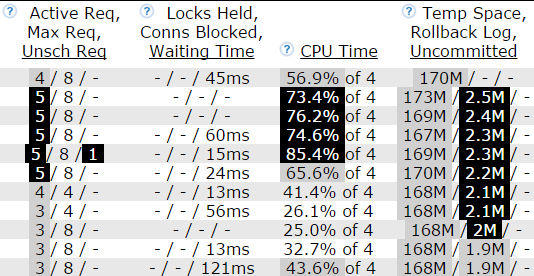
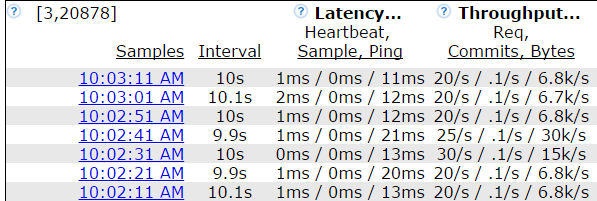
This article explores the second point by constructing adhoc queries that mimic the Monitor dashboard tab of the Foxhound Menu page:


Here's where the data for the top list comes from, in the screenshot above:

Query 1: Summary List Of Target Databases

Jumping ahead, here's what the custom Summary List Of Target Databases query looks like when it's run in All Programs - Foxhound4 - Tools - Adhoc Query Foxhound Database via ISQL:


The SELECT below uses a WITH clause on lines 1 through 23 to create three local views:
  • v_latest_primary_key finds the latest sample_detail row for each target database; this is a big deal since Foxhound can store many thousands of sample_detail rows for each target database.

  • v_sample_detail makes use of v_latest_primary_key to return all the columns in those latest sample_detail rows.

  • v_active_alerts uses SQL Anywhere's LIST function to gather the alert_number values for all the Alerts that aren't Cancelled or All Clear; the predicate alert_union.alert_is_clear_or_cancelled = 'N' is an prime example of the value added by Foxhound's underlying rroad_alert_union view.

  • Tip: Foxhound doesn't let you create permanent views via CREATE VIEW, but it does let you create temporary views as "common table expressions" in the WITH clause. It also lets you code temporary views as "derived tables" inside the FROM clause, but the WITH clause is sometimes easier to understand and maintain.
WITH 
   v_latest_primary_key AS 
      ( SELECT sample_detail.sampling_id                           AS sampling_id,
               MAX ( sample_detail.sample_set_number )             AS sample_set_number
          FROM sample_detail
         GROUP BY sample_detail.sampling_id ),
   v_sample_detail AS
      ( SELECT sample_detail.*
          FROM sample_detail
                  INNER JOIN v_latest_primary_key
                          ON v_latest_primary_key.sampling_id       = sample_detail.sampling_id
                         AND v_latest_primary_key.sample_set_number = sample_detail.sample_set_number ),
   v_active_alerts AS
      ( SELECT alert_union.sampling_id                             AS sampling_id,
               LIST ( DISTINCT STRING ( 
                          '#',  
                          alert_union.alert_number ),
                      ', '
                      ORDER BY alert_union.alert_number )          AS active_alert_number_list
         FROM alert_union
        WHERE alert_union.record_type                 = 'Alert'
          AND alert_union.alert_is_clear_or_cancelled = 'N'
         GROUP BY alert_union.sampling_id )
SELECT sampling_options.sampling_id                                AS "ID",
       STRING ( 
          sampling_options.selected_name,
          IF sampling_options.selected_tab = '1'
             THEN '(DSN)' 
             ELSE '' 
          END IF )                                                 AS "Target Database",
       sampling_options.connection_status_message                  AS "Monitor Status",
       COALESCE ( v_active_alerts.active_alert_number_list, '-' )  AS "Active Alerts",
       IF  sampling_options.sampling_should_be_running = 'Y' 
       AND sampling_options.connection_status_message  = 'Sampling OK'
          THEN rroad_f_msecs_as_abbreviated_d_h_m_s_ms ( 
                 v_sample_detail.canarian_query_elapsed_msec ) 
          ELSE '-'
       ENDIF                                                       AS "Heartbeat",
       IF COALESCE ( v_sample_detail.UnschReq, 0 ) = 0
          THEN '-'
          ELSE STRING ( v_sample_detail.UnschReq )
       ENDIF                                                       AS "Unsch Req",
       IF COALESCE ( v_sample_detail.ConnCount, 0 ) = 0
          THEN '-'
          ELSE STRING ( v_sample_detail.ConnCount )
       ENDIF                                                       AS "Conns",
       IF COALESCE ( v_sample_detail.total_blocked_connection_count, 0 ) = 0
          THEN '-'
          ELSE STRING ( 
             v_sample_detail.total_blocked_connection_count )
       ENDIF                                                       AS "Blocked",
       CASE
          WHEN COALESCE ( v_sample_detail.interval_CPU_percent, 0.0 ) = 0.0
             THEN '-'
          ELSE STRING ( ROUND ( 
             v_sample_detail.interval_CPU_percent, 1 ), '%' )
       END                                                         AS "CPU Time"
  FROM sampling_options
          LEFT OUTER JOIN v_sample_detail
                       ON v_sample_detail.sampling_id = sampling_options.sampling_id
          LEFT OUTER JOIN v_active_alerts
                       ON v_active_alerts.sampling_id = sampling_options.sampling_id
 ORDER BY "Target Database", 
       "ID";
The SELECT statement on lines 24 through 64 gathers columns from sampling_options, v_sample_detail and v_active_alerts; in particular:
  • The STRING function call on lines 25 through 30 determines if the sampling_options.selected_name column contains a DSN or a Foxhound connection string name.

  • The IF expression on lines 33 through 38 makes use of the Foxhound function rroad_f_msecs_as_abbreviated_d_h_m_s_ms() to display the sample_detail.canarian_query_elapsed_msec column.

Query 2: Active Alerts For Each Target Database

Here's what the ISQL output looks like for the second custom query, the one listing "Active Alerts":


Here's where the data comes from:
  • The ID and Target Database columns come from sampling_id and selected_name in the sampling_options view.

  • The Time Since Alert Recorded column is calculated from the recorded_at column in the alert_union view, using DATEDIFF(), CURRENT TIMESTAMP and the Foxhound function rroad_f_msecs_as_abbreviated_d_h_m_s_ms().

  • The Alert # and Alert Description columns come from alert_number and alert_description in the alert_union view.
SELECT sampling_options.sampling_id                 AS "ID",
       STRING ( 
          sampling_options.selected_name,
          IF sampling_options.selected_tab = '1'
             THEN '(DSN)' 
             ELSE '' 
          END IF )                                  AS "Target Database",
       rroad_f_msecs_as_abbreviated_d_h_m_s_ms ( 
          DATEDIFF ( MILLISECOND, 
                     alert_union.recorded_at, 
                     CURRENT TIMESTAMP ) )          AS "Time Since Alert Recorded",
       alert_union.alert_number                     AS "Alert #",
       alert_union.alert_description                AS "Alert Description"
  FROM sampling_options
          INNER JOIN alert_union
                  ON alert_union.sampling_id = sampling_options.sampling_id
 WHERE alert_union.record_type                 = 'Alert'
   AND alert_union.alert_is_clear_or_cancelled = 'N'
 ORDER BY "Target Database", 
       "ID", 
       "Alert #";


Tuesday, November 22, 2016

Foxhound's New Ping Process

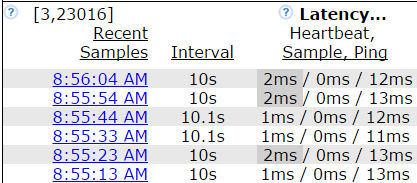
Foxhound 4 is the first database monitor for SQL Anywhere that tests the target database's ability to accept new connections.

Foxhound does this with a special ping process that opens a new connection to the target database via the embedded SQL interface, issues a SELECT @@SPID command and then immediately disconnects.

This is different from the regular Foxhound sampling process which connects to the target database via ODBC and keeps that connection open while it collects multiple samples. It is also different from the SQL Anywhere dbping.exe utility; the Foxhound ping is a low-overhead process that's built in to Foxhound.

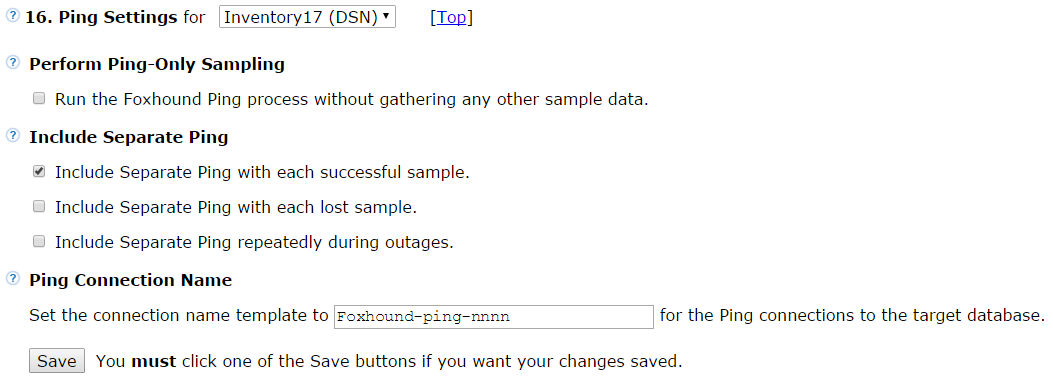
The Foxhound ping process comes in three flavors:

  1. As an addition to the Foxhound Monitor sampling process.

    The separate ping process tests the target database's ability to accept new connections as well as providing data for a third measure of response time: ping response time.


  2. As a complete alternative to Foxhound's sampling process.

    Ping-only sampling may be used to check for Alert #1 Database unavailable without storing a lot of data in the Foxhound database.


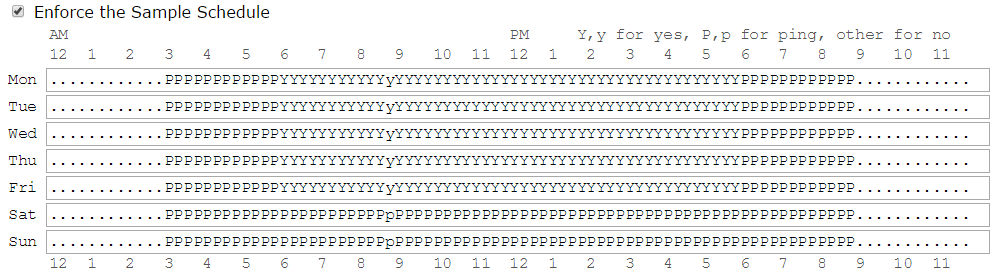
  3. As an addition to Y/N Sample Schedule settings.

    "P" for ping-only may be specified at various times of the day. For example, ping-only sampling might be scheduled during the overnight hours

    • when a large connection pool is mostly idle and/or

    • when a heavy load from a few connections is expected, and

    • folks care more about availability than about connection-level performance.

The Monitor Options page lets you specify the ping settings for each target database:


With Conflict Comes Confusion


The ping-only sampling option overrides (turns off, disables) several other Foxhound features including
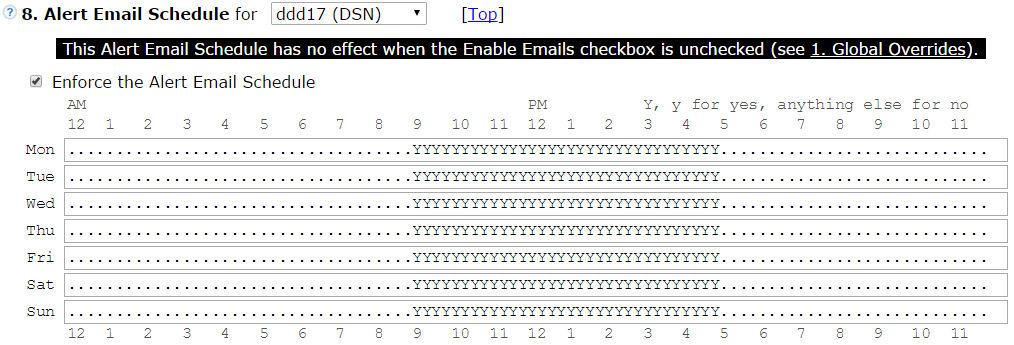
  • Alerts and Alert Email Schedule, except for Alert # 1 Database unavailable,

  • AutoDrop and AutoDrop Schedule,

  • Sample Schedules, even if P-for-ping-only is specified, and

  • Connection Sample Schedules.
Conflicts like those lead to confusion, and confusion leads to Frequently Asked Questions like:

  • "Why aren't Alert emails being sent?"

  • "Why isn't the Sample Schedule working?"

  • "Why aren't blocked connections being dropped?"
The new  Banner Warnings  feature has been added to Foxhound 4 to help deal with confusion caused by conflicts among different options; here's what' you see when you specify ping-only sampling:

Banner warnings appear all over the place in Foxhound 4. That is especially true for ping-only sampling because it affects so many other options; for example, here's what the Sample Schedule section looks like on the Monitor Options page:


Tuesday, November 15, 2016

Foxhound 4 White Paper

You can download the Foxhound 4 White Paper here, or read it here:


Friday, November 4, 2016

Foxhound Version 4 Is Now Available

Version 4 of the Foxhound database monitor for SAP® SQL Anywhere® is now available for purchase and download here.

You can see What's New in the FAQ; here are the Top 6 Release-Defining Features:

1. A new custom "ping" process tests separate connections to the target database.


The Foxhound ping process opens a new connection to the target database via the embedded SQL interface, issues a SELECT @@SPID command and then immediately disconnects. This is different from the Foxhound Monitor process which connects to the target database via ODBC and keeps that connection open while it collects multiple samples.

The new ping process comes in three flavors:

  1. As an addition to the Foxhound Monitor sampling process.

    The separate ping process tests the target database's ability to accept new connections as well as providing data for a third measure of response time: ping response time.


  2. As a complete alternative to Foxhound's sampling process.

    Ping-only sampling may be used to check for Alert #1 Database unavailable without storing a lot of data in the Foxhound database.


  3. As an addition to Y/N Sample Schedule settings.

    "P" for ping-only may be specified at various times of the day. For example, ping-only sampling might be scheduled during the overnight hours

    • when a large connection pool is mostly idle, or

    • when a heavy load is expected and nobody much cares about performance.

The Monitor Options page lets you specify the ping settings for each target database:


2. Foxhound now supports SQL Anywhere 17.


Foxhound now supports target databases that run on any version of SQL Anywhere 6 through 17, including 17.0.4.

Foxhound itself will now run on SQL Anywhere 17, or SQL Anywhere 16 build 2127 or later.

Here are some other new features specific to SQL Anywhere 17:

  • Incomplete Reads, Writes columns have been reintroduced for SQL Anywhere 17 target databases

  • Alert #15 - Incomplete I/Os has been reintroduced for SQL Anywhere 17 target databases

  • The Foxhound shortcuts choose SQL Anywhere 17 over 16, and 64-bit over 32-bit, by default

  • Mutex and semaphore locks are now included in the connection-level Current Req Status and Block Reason: fields


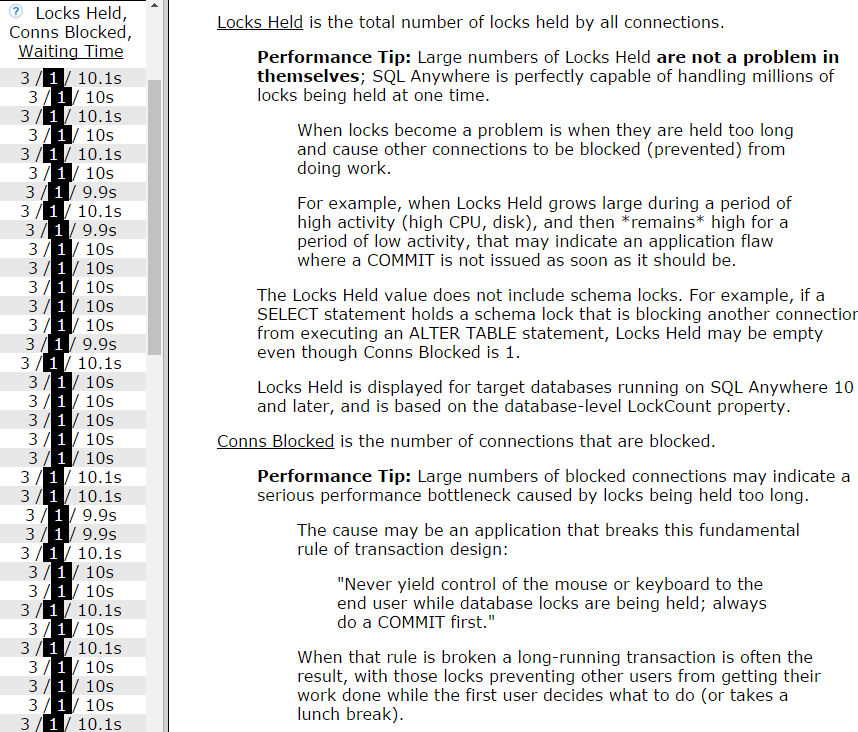
3. Context-sensitive Performance Tips have been added throughout the Help.

The Help has been redesigned and expanded to include
  • Performance Tips by the dozen, all over the place, exactly where you need them,

  • details about where the data's coming from (which SQL Anywhere properties) and

  • statements of support (which versions of SQL Anywhere provide which performance measurements).

Here's an example:


Plus, now it's easy to open and close the Help frame any time you want.

  • Each new Foxhound page opens without the Help frame showing,

  • any of the context-sensitive (?) icons opens the Help frame, and

  • the [X] closes it again.

  • When you resize the Help frame before closing it, Foxhound remembers how wide it was when you open it again.

4.  No more pink!  Black and white and grey are now used for highlighting.


Foxhound has always used colors  like this  and  this  to highlight important information.

Foxhound 4 now uses  white-on-black  and  grey  for these reasons:

  • White-on-black text is just as dramatic as any color,

  • monochrome printers do a really bad job with colors, and

  • folks with color vision deficiency might have an easier time with the black-grey-white color scheme.


Foxhound 4 also uses white-on-black to highlight important information about Foxhound settings and status values; for example:

  •  Sampling stopped  when the Monitor is not gathering any data.

  • SPs  NNN  when the Monitor can't call these three stored procedure on the target database: rroad_connection_properties, rroad_database_properties and rroad_engine_properties.

  • Favorable?  YNY  when one or more of the RememberLastPlan, RememberLastStatement and RequestTiming server options are not set on the target server.

  • Purge  Off  when the Foxhound purge isn't deleting anything.

Also, alternating row colors are used for the Monitor, Sample History and other multi-row displays:


5.  Banner warnings  now expose conflicts among different Monitor Options page settings.


Individual settings on the Monitor Options page might be simple to understand and easy to use, but . . . conflicts among different settings aren't so simple or easy.

. . . and these conflicts lead to the most Frequently Asked Questions:

  • Why aren't Alert emails being sent?

  • Why isn't the Sample Schedule working?

  • Why aren't blocked connections being dropped?

Foxhound now warns about these conflicts on the Monitor Options page:


6. let you switch among multiple target databases.


If you're dealing with dozens of databases, you might like this new feature best of all!

It works on the Monitor and Sample History pages, and on the Monitor Options page as well.


...see more new features here.


Friday, August 26, 2016

Downgrading A Database From SQL Anywhere 17 to 16

Question: How do I switch to SQL Anywhere 16 after upgrading my database to version 17?

Answer: The bad news is, there's no dbunload -downgrade option.

The good news is, it might not be very difficult, at least according to a preliminary test using the SQL Anywhere 17 demo database:

  • Step 1. Start the current database with V17 dbsrv17.exe

  • Step 2. Unload the current database with V17 dbunload.exe

  • Step 3. Copy the V17 reload file to the V16 folder

  • Step 4. Manually edit the V16 reload file

  • Step 5. Create the new database with V16 dbinit.exe

  • Step 6. Start the new database with V16 dbsrv16.exe

  • Step 7. Open an ISQL session with V16 dbisql.com

  • Step 8. Run the edited V16 reload file in ISQL

  • Repeat as required, possibly starting at Step 4

"Can I try this at home?"

This demo does not address the following questions...
  1. "How do I undo the changes I had to make when upgrading to SQL Anywhere 17?"

  2. "Will the new objects (e.g., roles) cause problems in SQL Anywhere 16?"

  3. "Will the column statistics work properly?"

  4. "What about the MobiLink stuff?"

    "Have I forgotten anything? Oh, yeah..."

  5. "Will this work for my giant production database?"
Here's the batch file used for testing, followed by some comments and another batch file to clean up before starting over:
ECHO OFF
REM  ******************************** 
ECHO Step 0. Set up folders and files
C:
CD C:\
MD TEMP
CD C:\TEMP
MD data
CD C:\TEMP\data
MD V16
MD V17
COPY /B /V /Y "%SQLANYSAMP17%\demo.db" "C:\TEMP\data\V17\demo.db"
COPY /B /V /Y "%SQLANYSAMP17%\demo.log" "C:\TEMP\data\V17\demo.log"
PAUSE

REM  ******************************************************* 
ECHO Step 1. Start the current database with V17 dbsrv17.exe
"%SQLANY17%\bin64\dbspawn.exe"^
  -f "%SQLANY17%\bin64\dbsrv17.exe"^
  -n demo17^
  -o "C:\TEMP\data\V17\dbsrv17_log_demo17.txt"^
  "C:\TEMP\data\V17\demo.db"
PAUSE

REM  ********************************************************* 
ECHO Step 2. Unload the current database with V17 dbunload.exe
"%SQLANY17%\Bin64\dbunload.exe"^
  -c "ENG=demo17; DBN=demo; UID=dba; PWD=sql;"^
  -r "C:\TEMP\data\V17\reload17.sql"^
  -up^
  "C:\TEMP\data\V17\data17"
PAUSE

REM  ************************************************** 
ECHO Step 3. Copy the V17 reload file to the V16 folder
COPY /V /Y "C:\TEMP\data\V17\reload17.sql" "C:\TEMP\data\V16\reload16.sql"
PAUSE

REM  ***************************************** 
ECHO Step 4. Manually edit the V16 reload file
ECHO [edit reload16.sql]
PAUSE

REM  *************************************************** 
ECHO Step 5. Create the new database with V16 dbinit.exe
"%SQLANY16%\bin64\dbinit.exe"^
  -p 4096^
  "C:\TEMP\data\V16\demo.db"
PAUSE

REM  *************************************************** 
ECHO Step 6. Start the new database with V16 dbsrv16.exe
"%SQLANY16%\bin64\dbspawn.exe"^
  -f "%SQLANY16%\bin64\dbsrv16.exe"^
  -n demo16^
  -o "C:\TEMP\data\V16\dbsrV16_log_demo16.txt"^
  "C:\TEMP\data\V16\demo.db" 
PAUSE

REM  ************************************************ 
ECHO Step 7. Open an ISQL session with V16 dbisql.com
"%SQLANY16%\bin64\dbisql.com"^
  -c "ENG=demo16; DBN=demo; UID=dba; PWD=sql;"
PAUSE

REM  **********************************************
ECHO Step 8. Run the edited V16 reload file in ISQL
ECHO [copy, paste and run reload16.sql]
PAUSE

REM  *************************** 
ECHO Repeat as required
ECHO [you might be able to start at Step 4]
ECHO All done...
PAUSE
The dbunload -up option in Step 2 is new with SQL Anywhere 17:
New -up option for the Unload utility (dbunload) and 
   the Extract utility (dbxtract) 

This option allows the unloading of passwords. There are  
   behavior changes associated with its use. See UNLOAD  
   utility, and Extract Utility (dbxtract).

-up 

Unloads user passwords (hashed value). You do not need to 
   specify this option if you are performing an unload with  
   reload (-ac, -an, or -ar option).
If you don't specify dbunload -up in Step 2 the following text in the reload SQL file will stop Step 8 from working:
****************** WARNING *******************************
*                                                        *
* This file contains user definitions with removed       *
* password values.                                       *
* It should not be used to create a new database.        *
*                                                        *
****************** WARNING *******************************
If you want to avoid this error in Step 8:
Could not execute statement.

User ID 'SYS_RUN_PROFILER_ROLE' does not exist
SQLCODE=-140, ODBC 3 State="28000"
Line 157, column 1
You can continue executing or stop.

GRANT DELETE ANY TABLE TO "SYS_RUN_PROFILER_ROLE" WITH NO ADMIN OPTION
...you will have to remove these lines in Step 4:
GRANT DELETE ANY TABLE TO "SYS_RUN_PROFILER_ROLE" WITH NO ADMIN OPTION
go
...or you can just choose "Continue" after each error in Step 8 :)

The -p 4096 in Step 5 is the default... it's just a reminder that when you run the "Old School" method using separate dbunload and dbinit steps, you are on your own when it comes to dbinit options.

Here's the batch file to clean up after running the demo:
ECHO OFF
ECHO Are you sure you want to delete all the files?
PAUSE 

"%SQLANY16%\bin64\dbstop.exe"^
  -c "ENG=demo16; DBN=demo; UID=dba; PWD=sql;"^
  -y

"%SQLANY17%\bin64\dbstop.exe"^
  -c "ENG=demo17; DBN=demo; UID=dba; PWD=sql;"^
  -y

ECHO Wait until the databases are stopped, then
PAUSE 

RD /S /Q C:\TEMP\data\V16
RD /S /Q C:\TEMP\data\V17

ECHO All done...
PAUSE


Wednesday, June 8, 2016

Foxhound Version 4 Is Coming Later This Summer

Foxhound is a third-party database performance monitor for SAP® SQL Anywhere®.

Foxhound Version 3 has been around for a while, and Version 4 ... will ... may ... should be available later this summer :)

Here's a teeny-tiny excerpt from the full What's New:

  • Foxhound Version 4 will support target databases running on SQL Anywhere 17...

  • ...including SQL Anywhere 17.0.4. Foxhound 4 will also support target databases running on SQL Anywhere versions 5.5 through 16, but so does Foxhound 3 now.

  • Foxhound 4 itself will run on either SQL Anywhere 16 or 17.

  • When Foxhound 4 itself is running on SQL Anywhere 16 it will still handle a target database running on SQL Anywhere 17.


Foxhound 4 Will Be FREE! ( Some Restrictions Apply :)


If you're thinking you need a performance monitor for SQL Anywhere, one that actually works, don't hold back...

From this date forward, if you purchase Foxhound 3, you'll be able to upgrade to Version 4 at no charge as soon as it's available.

Dilbert.com 1996-04-21


Monday, June 6, 2016

SQL Anywhere 17.0.4 Is Now Available

SQL Anywhere 17.0.4 is a way cool upgrade to SQL Anywhere 17.

The announcement is on the forum here.

The What's New is in DCX here.

The download is located

  • somewhere on sap.com (see editor's note)

  • as an EBF called 17.0.4.2053

  • in the file SQLANYW170000P_8-71001031.ZIP

  • with the title SQL Anywhere 17.0 SP0 PL8 Build 2053

  • and the release date 02.06.2016.


Editor's Note: Management apologizes for the sarcastic comment "somewhere on sap.com".

Life's too short to keep track of where anything is on the SAP website, let alone keep up with link rot.


Saturday, May 28, 2016

Buy SQL Anywhere 17 on Amazon

It's hard to believe, but true: search amazon.com on "SQL Anywhere Edge" (without the quotes) and you see this:

  • Don't try this outside the US or UK... it won't work in the South Sudan, Yemen, Canada... ha, ha, the Canadian developers of SQL Anywhere aren't allowed to buy a copy :)

  • The original May 25 announcement is here.

  • The screenshot says "Jul 15, 2015" but if drill down to the product descriptions they say "Date first available at Amazon.com: May 11, 2016".

  • FWIW the screenshot shows the Vivaldi browser in action... every time I think "That doesn't work in Vivaldi!" it turns out "My mistake, lemme try again!" :)

  • I don't know if the SQL Anywhere Edge prices include an SAP S-user id which is necessary to gain access to EBFs and such-like. I'm guessing "No" because the product description doesn't say "Yes".

  • I don't know if the prices require an extra fee for "support", together with increasingly-shrill dunning emails if you don't pay the second-year renewal. I'm guessing "No" because it's a moot point without an S-user id.

...but hey! It's SQL Anywhere on Amazon, and that's way cool!


Monday, October 26, 2015

Funniest Line From TechEd 2016


"SAP never really admits to the fact that it will sell you one of its cheaper databases assimilated as part of its Sybase acquisition, but it kind of will."
- Adrian Bridgwater, SAP's Platform-Play: Reengineering Programming For The 'New' Economics

If anyone knows what "it kind of will" means, will you let me know?

Yeah, yeah, I know what the words mean... what I want to know is, how exactly does one buy the SQL Anywhere database server these days?

Not from the SAP Store, one doesn't :)

"We're working to correct this"


Let's be optimisic!

The SQL Anywhere server will soon be available on the SAP Store!

Let's not fret about "licensing model"... or "up the chain" :)

Second Funniest Line From TechEd 2016


"Wednesday turned out to be quite a productive day here at TechEd. It started bright and early with the session DMM106 "Introduction to SAP SQL Anywhere". I had no clue SAP SQL Anywhere existed until I saw the TechEd agenda few weeks earlier, so this definitely goes with the "exploration" theme this year. Had an extra cup of coffee and was prepared to sneak out in the middle, but surprisingly Jose Ramos from SAP kept the lively session flow and made the information quite simple to understand even for non-experts like myself. Well done."
- Jelena Perfiljeva, TechEd 2015 - ABAPosaurus meets other animals (Day 3)

It's always funny when someone says "I had no clue SAP SQL Anywhere existed"... or sad... or depressing, depending on your mood.

But... if a PowerBuilder Revival Movement is truly underway, can a SQL Anywhere Revival be far behind? :)

Dilbert.com 2012-11-23

Tuesday, October 20, 2015

A PowerBuilder Revival?

Moving Forward with SAP PowerBuilder
Posted by Bruce Armstrong in PowerBuilder Developer Center on May 8, 2015 11:48:30 AM


Note this comment...
Q: What about SQL Anywhere?
A: SQL Anywhere is an official SAP product and they have big plans for it.

Then there's this...

Webcast 1: Vision for PowerBuilder
Date: Thursday, October 29, 2015. 9:00 AM PST (San Francisco) / 18H00 CET( Berlin)
Presenter: Armeen Mazda, CEO of Appeon Corporation

I've signed up, how about you? :)

Sunday, October 18, 2015

Latest SQL Anywhere Updates: Linux 17.0.0.1268 plus others

How find the Current builds for the active platforms

A - Z Index Support Packages and Patches  Note: There is a separate page for A - Z Index Installations and Upgrades.

Click on S                                An "S0099999999" s-userid and password will be requested.
                                          You have to buy SQL Anywhere to get one (see SAP Store below).

Click on SYBASE SQL ANYWHERE              The browser right-mouse button has been disabled. 

                                          The browser Back button button has been messed up. Use the links to back up.

Click on SYBASE SQL ANYWHERE 12.0         Be patient, you're almost there! 
           - or -
         SYBASE SQL ANYWHERE 16.0 
           - or -
         SYBASE SQL ANYWHERE 17.0

Pick a platform.                          Keep going...

Scroll way down, if necessary.            ...old builds appear at the top.

Current builds for the active platforms

     SYBASE SQL ANYWHERE 12.0
AIX 64bit                     SQLANYW120087_0-21010434.TGZ   SP87   12.0.1.4224   23.02.2015
AIX 64bit                     SQLANYW120093_0-21010434.TGZ   SP93   12.0.1.4224   17.09.2015 (same build, new file and date)
HP-UX on IA64 64bit           SQLANYW120087_0-21010527.TGZ   SP87   12.0.1.4224   23.02.2015
HP-UX on IA64 64bi            SQLANYW120093_0-21010527.TGZ   SP93   12.0.1.4224   17.09.2015 (same build, new file and date)
Linux on IA32 32bit           SQLANYW120091_0-21011596.TGZ   SP91   12.0.1.4294   13.08.2015
Linux on x86_64 64bit         SQLANYW120091_0-21010433.TGZ   SP91   12.0.1.4294   13.08.2015
Mac OS                        SQLANYW120064_0-21011522.TGZ   SP64   12.0.1.3958   18.10.2013
MacOS X 32-bit                SQLANYW120001P_10-21010525.TGZ        12.0.1.3577   07.12.2012
MacOS X 64-bit                SQLANYW120094_0-11013378.TGZ   SP94   12.0.1.4318   28.09.2015 (new build)
Solaris on SPARC 64bit        SQLANYW120087_0-21010526.TGZ   SP87   12.0.1.4224   23.02.2015
Solaris on SPARC 64bit        SQLANYW120093_0-21010526.TGZ   SP93   12.0.1.4224   17.09.2015 (same build, new file and date)
Solaris on x86_64 64bit       SQLANYW120087_0-21010528.TGZ   SP87   12.0.1.4224   23.02.2015
Solaris on x86_64 64bit       SQLANYW120093_0-21010528.TGZ   SP93   12.0.1.4224   17.09.2015 (same build, new file and date)
Solaris x86 32bit             SQLANYW120060_0-21011521.TGZ   SP60   12.0.1.3894   21.09.2013
Win32                         SQLANYW120092_0-21010431.ZIP   SP92   12.0.1.4301   20.08.2015
Windows on x64 64bit          SQLANYW120092_0-21010432.ZIP   SP92   12.0.1.4301   20.08.2015

     SYBASE SQL ANYWHERE 16.0
AIX 64bit                     SQLANYW160034_0-11013266.TGZ   SP34   16.0.0.2111   07.05.2015
HP-UX on IA64 32bit           SQLANYW160027_0-81000148.TGZ   SP27   16.0.0.2041   03.12.2014
HP-UX on IA64 64bit           SQLANYW160034_0-11013265.TGZ          16.0.0.2111   20.04.2015
HP-UX on IA64 64bit           SQLANYW160040_0-11013265.TGZ   SP40   16.0.0.2111   17.09.2015 (same build, new file and date)
Linux on ARM 32bit            SQLANYW160032_0-81000331.TGZ   SP32   16.0.0.2087   17.03.2015
Linux on IA32 32bit           SQLANYW160041_0-21011525.TGZ   SP41   16.0.0.2184   06.10.2015 (new build)
Linux on x86_64 64bit         SQLANYW160041_0-21011526.TGZ   SP41   16.0.0.2184   06.10.2015 (new build)
Mac OS                        SQLANYW160015_0-81000150.TGZ   SP15   16.0.0.1948   15.07.2014
MacOS X 64-bit                SQLANYW160032_0-21011527.TGZ   SP32   16.0.0.2087   02.03.2015
Solaris on SPARC 32bit        SQLANYW160015_0-81000242.TGZ   SP15   16.0.0.1948   15.07.2014
Solaris on SPARC 64bit        SQLANYW160034_0-11013358.TGZ   SP34   16.0.0.2111   07.05.2015 
Solaris on x86_64 64bit       SQLANYW160034_0-11013267.TGZ          16.0.0.2111   20.04.2015
Solaris on x86_64 64bit       SQLANYW160040_0-11013267.TGZ   SP40   16.0.0.2111   17.09.2015 (same build, new file and date)
Solaris x86 32bit             SQLANYW160015_0-81000241.TGZ   SP15   16.0.0.1948   15.07.2014
Win32                         SQLANYW160042_0-11013146.ZIP   SP42   16.0.0.2178   13.10.2015 (new build)
Windows on x64 64bit          SQLANYW160042_0-11013189.ZIP   SP42   16.0.0.2178   13.10.2015 (new build)

     SYBASE SQL ANYWHERE 17.0
Linux on IA32 32bit           SQLANYW170000P_2-71001070.TGZ   SP0 PL2   17.0.0.1268   29.09.2015 (new build)
Linux on x86_64 64bit         SQLANYW170000P_2-71001069.TGZ   SP0 PL2   17.0.0.1268   29.09.2015 (new build)
Windows Server on IA32 32bit  SQLANYW170000P_1-71001032.ZIP   SP0       17.0.0.1211   01.09.2015
Windows on x64 64bit          SQLANYW170000P_1-71001031.ZIP   SP0       17.0.0.1211   01.09.2015


SQL Anywhere 16 Developer Edition (Windows download is 16.0.0.2043)
SQL Anywhere 17 Developer Edition (Windows download is 17.0.0.1062 GA)


SAP Store - SQL Anywhere                  Scroll down to "Configure - Select License" to see actual software.
                                          Currently only the "SAP SQL Anywhere, Database and Sync Client"
                                          is available for purchase on the SAP Store.

SAP Phone Numbers - non-technical         24 by 7, 365 days

SAP Incident Wizard - technical           An "S0099999999" s-userid and password will be requested.
                                          You have to buy SQL Anywhere to get one (see SAP Store above).

Announcing SQL Anywhere 17!                            by Chris Kleisath 

SQL Anywhere 17 Documentation - At your fingertips!    by Laura Nevin

Recommended ODBC Drivers for MobiLink                  Only drivers for MobiLink 16 are shown.

[most links checked October 18, 2015]

Tuesday, September 1, 2015

Latest SQL Anywhere Updates: 17.0.0.1211

How find the Current builds for the active platforms

A - Z Index Support Packages and Patches  Note: There is a separate page for A - Z Index Installations and Upgrades.

Click on S                                An "S0099999999" s-userid and password will be requested.
                                          You have to buy SQL Anywhere to get one (see SAP Store below).

Click on SYBASE SQL ANYWHERE              The browser right-mouse button has been disabled. 

                                          The browser Back button button has been messed up. Use the links to back up.

Click on SYBASE SQL ANYWHERE 12.0         Be patient, you're almost there! 
           - or -
         SYBASE SQL ANYWHERE 16.0 
           - or -
         SYBASE SQL ANYWHERE 17.0 

Pick a platform.                          Keep going...

Scroll way down, if necessary.            ...old builds appear at the top.

Current builds for the active platforms

     SYBASE SQL ANYWHERE 12.0
AIX 64bit                     SQLANYW120087_0-21010434.TGZ   SP87   12.0.1.4224   23.02.2015
HP-UX on IA64 64bit           SQLANYW120087_0-21010527.TGZ   SP87   12.0.1.4224   23.02.2015
Linux on IA32 32bit           SQLANYW120091_0-21011596.TGZ   SP91   12.0.1.4294   13.08.2015
Linux on x86_64 64bit         SQLANYW120091_0-21010433.TGZ   SP91   12.0.1.4294   13.08.2015
Mac OS                        SQLANYW120064_0-21011522.TGZ   SP64   12.0.1.3958   18.10.2013
MacOS X 32-bit                SQLANYW120001P_10-21010525.TGZ        12.0.1.3577   07.12.2012
MacOS X 64-bit                SQLANYW120085_0-11013378.TGZ   SP85   12.0.1.4201   24.12.2014
Solaris on SPARC 64bit        SQLANYW120087_0-21010526.TGZ   SP87   12.0.1.4224   23.02.2015
Solaris on x86_64 64bit       SQLANYW120087_0-21010528.TGZ   SP87   12.0.1.4224   23.02.2015
Solaris x86 32bit             SQLANYW120060_0-21011521.TGZ   SP60   12.0.1.3894   21.09.2013
Win32                         SQLANYW120092_0-21010431.ZIP   SP92   12.0.1.4301   20.08.2015
Windows on x64 64bit          SQLANYW120092_0-21010432.ZIP   SP92   12.0.1.4301   20.08.2015

     SYBASE SQL ANYWHERE 16.0
AIX 64bit                     SQLANYW160034_0-11013266.TGZ   SP34   16.0.0.2111   07.05.2015
HP-UX on IA64 32bit           SQLANYW160027_0-81000148.TGZ   SP27   16.0.0.2041   03.12.2014
HP-UX on IA64 64bit           SQLANYW160034_0-11013265.TGZ          16.0.0.2111   20.04.2015
Linux on ARM 32bit            SQLANYW160032_0-81000331.TGZ   SP32   16.0.0.2087   17.03.2015
Linux on IA32 32bit           SQLANYW160036_0-21011525.TGZ   SP36   16.0.0.2138   30.06.2015
Linux on x86_64 64bit         SQLANYW160038_0-21011526.TGZ   SP38   16.0.0.2165   20.08.2015
Mac OS                        SQLANYW160015_0-81000150.TGZ   SP15   16.0.0.1948   15.07.2014
MacOS X 64-bit                SQLANYW160032_0-21011527.TGZ   SP32   16.0.0.2087   02.03.2015
Solaris on SPARC 32bit        SQLANYW160015_0-81000242.TGZ   SP15   16.0.0.1948   15.07.2014
Solaris on SPARC 64bit        SQLANYW160034_0-11013358.TGZ   SP34   16.0.0.2111   07.05.2015 
Solaris on x86_64 64bit       SQLANYW160034_0-11013267.TGZ          16.0.0.2111   20.04.2015
Solaris x86 32bit             SQLANYW160015_0-81000241.TGZ   SP15   16.0.0.1948   15.07.2014
Win32                         SQLANYW160037_0-11013146.ZIP   SP37   16.0.0.2158   05.08.2015
Windows on x64 64bit          SQLANYW160037_0-11013189.ZIP   SP37   16.0.0.2158   05.08.2015 

     SYBASE SQL ANYWHERE 17.0
Windows Server on IA32 32bit  SQLANYW170000P_1-71001032.ZIP  SP0    17.0.0.1211   01.09.2015
Windows on x64 64bit          SQLANYW170000P_1-71001031.ZIP  SP0    17.0.0.1211   01.09.2015

SQL Anywhere 16 Developer Edition (Windows download is 16.0.0.2043)
SQL Anywhere 17 Developer Edition (Windows download is 17.0.0.1062 GA)


SAP Store - SQL Anywhere                  Scroll down to "Configure - Select License" to see actual software.
                                          Only Version 17 is available for purchase on the SAP Store.

SAP Phone Numbers - non-technical         24 by 7, 365 days
                                          Perhaps Version 12 and 16 are available for purchase by phone.

SAP Incident Wizard - technical           An "S0099999999" s-userid and password will be requested.
                                          You have to buy SQL Anywhere to get one (see SAP Store above).

Announcing SQL Anywhere 17!                            by Chris Kleisath 

SQL Anywhere 17 Documentation - At your fingertips!    by Laura Nevin

Recommended ODBC Drivers for MobiLink                  Only drivers for MobiLink 16 are shown.

[most links checked September 1, 2015]

Monday, August 24, 2015

Latest SQL Anywhere Updates: Aug 24 2015

How find the Current builds for the active platforms

A - Z Index Support Packages and Patches  Note: There is a separate page for A - Z Index Installations and Upgrades.

Click on S                                An "S0099999999" s-userid and password will be requested.
                                          You have to buy SQL Anywhere to get one (see SAP Store below).

Click on SYBASE SQL ANYWHERE              The browser right-mouse button has been disabled. 

                                          The browser Back button button has been messed up. Use the links to back up.

Click on SYBASE SQL ANYWHERE 12.0         Be patient, you're almost there! 
           - or -
         SYBASE SQL ANYWHERE 16.0         Don't click on SQL ANYWHERE 17.0, there aren't any EBFs yet. 

Pick a platform.                          Keep going...

Scroll way down, if necessary.            ...old builds appear at the top.

Current builds for the active platforms

     SYBASE SQL ANYWHERE 12.0
AIX 64bit                SQLANYW120087_0-21010434.TGZ   SP87   12.0.1.4224   23.02.2015
HP-UX on IA64 64bit      SQLANYW120087_0-21010527.TGZ   SP87   12.0.1.4224   23.02.2015
Linux on IA32 32bit      SQLANYW120091_0-21011596.TGZ   SP91   12.0.1.4294   13.08.2015
Linux on x86_64 64bit    SQLANYW120091_0-21010433.TGZ   SP91   12.0.1.4294   13.08.2015
Mac OS                   SQLANYW120064_0-21011522.TGZ   SP64   12.0.1.3958   18.10.2013
MacOS X 32-bit           SQLANYW120001P_10-21010525.TGZ        12.0.1.3577   07.12.2012
MacOS X 64-bit           SQLANYW120085_0-11013378.TGZ   SP85   12.0.1.4201   24.12.2014
Solaris on SPARC 64bit   SQLANYW120087_0-21010526.TGZ   SP87   12.0.1.4224   23.02.2015
Solaris on x86_64 64bit  SQLANYW120087_0-21010528.TGZ   SP87   12.0.1.4224   23.02.2015
Solaris x86 32bit        SQLANYW120060_0-21011521.TGZ   SP60   12.0.1.3894   21.09.2013
Win32                    SQLANYW120092_0-21010431.ZIP   SP92   12.0.1.4301   20.08.2015
Windows on x64 64bit     SQLANYW120092_0-21010432.ZIP   SP92   12.0.1.4301   20.08.2015

     SYBASE SQL ANYWHERE 16.0
AIX 64bit                SQLANYW160034_0-11013266.TGZ   SP34   16.0.0.2111   07.05.2015
HP-UX on IA64 32bit      SQLANYW160027_0-81000148.TGZ   SP27   16.0.0.2041   03.12.2014
HP-UX on IA64 64bit      SQLANYW160034_0-11013265.TGZ          16.0.0.2111   20.04.2015
Linux on ARM 32bit       SQLANYW160032_0-81000331.TGZ   SP32   16.0.0.2087   17.03.2015
Linux on IA32 32bit      SQLANYW160036_0-21011525.TGZ   SP36   16.0.0.2138   30.06.2015
Linux on x86_64 64bit    SQLANYW160038_0-21011526.TGZ   SP38   16.0.0.2165   20.08.2015
Mac OS                   SQLANYW160015_0-81000150.TGZ   SP15   16.0.0.1948   15.07.2014
MacOS X 64-bit           SQLANYW160032_0-21011527.TGZ   SP32   16.0.0.2087   02.03.2015
Solaris on SPARC 32bit   SQLANYW160015_0-81000242.TGZ   SP15   16.0.0.1948   15.07.2014
Solaris on SPARC 64bit   SQLANYW160034_0-11013267.TGZ          16.0.0.2111   20.04.2015 withdrawn
Solaris on SPARC 64bit   SQLANYW160034_0-11013358.TGZ   SP34   16.0.0.2111   07.05.2015 replacement
Solaris on x86_64 64bit  SQLANYW160034_0-11013267.TGZ          16.0.0.2111   20.04.2015
Solaris x86 32bit        SQLANYW160015_0-81000241.TGZ   SP15   16.0.0.1948   15.07.2014
Win32                    SQLANYW160037_0-11013146.ZIP   SP37   16.0.0.2158   05.08.2015
Windows on x64 64bit     SQLANYW160037_0-11013189.ZIP   SP37   16.0.0.2158   05.08.2015 

SQL Anywhere 16 Developer Edition (Windows download is 16.0.0.2043)
SQL Anywhere 17 Developer Edition (Windows download is 17.0.0.1062 GA)


SAP Store - SQL Anywhere                  Scroll down to "Configure - Select License" to see actual software.
                                          Only Version 17 is available for purchase on the SAP Store.
SAP Phone Numbers - non-technical         24 by 7, 365 days
                                          Perhaps Version 12 and 16 are available for purchase by phone.
SAP Incident Wizard - technical           An "S0099999999" s-userid and password will be requested.
                                          You have to buy SQL Anywhere to get one (see SAP Store above).

Announcing SQL Anywhere 17!                            by Chris Kleisath 
SQL Anywhere 17 Documentation - At your fingertips!    by Laura Nevin
Recommended ODBC Drivers for MobiLink                  Only drivers for MobiLink 16 are shown.

[links checked August 24, 2015]

Friday, August 7, 2015

Latest SQL Anywhere Update: 16.0.0.2158 for Windows on x64 64bit

How find the Current builds for the active platforms

A - Z Index Support Packages and Patches  Note: There is a separate page for A - Z Index Installations and Upgrades.

Click on S                                An SAP "S0099999999" user id and password will be requested.
                                          You have to buy SQL Anywhere to get one (see SAP Store below).

Click on SYBASE SQL ANYWHERE              The browser right-mouse button has been disabled. 

                                          The browser Back button button has been messed up. Use the links to back up.

Click on SYBASE SQL ANYWHERE 12.0         Be patient, you're almost there! 
           - or -
         SYBASE SQL ANYWHERE 16.0         Don't click on SQL ANYWHERE 17.0, there aren't any EBFs yet. 

Pick a platform.                          Keep going...

Scroll way down, if necessary.            ...old builds appear at the top.

Current builds for the active platforms

     SYBASE SQL ANYWHERE 12.0
AIX 64bit                SQLANYW120087_0-21010434.TGZ   EBF 24239   SP87   12.0.1.4224   23.02.2015
HP-UX on IA64 64bit      SQLANYW120087_0-21010527.TGZ   EBF 24240   SP87   12.0.1.4224   23.02.2015
Linux on IA32 32bit      SQLANYW120087_0-21011596.TGZ   EBF 24217   SP87   12.0.1.4224   14.02.2015
Linux on x86_64 64bit    SQLANYW120087_0-21010433.TGZ   EBF 24217   SP87   12.0.1.4224   14.02.2015
Mac OS                   SQLANYW120064_0-21011522.TGZ   EBF 21796   SP64   12.0.1.3958   18.10.2013
MacOS X 32-bit           SQLANYW120001_0-21010525.TGZ   Upgrade of 12.0.0 to 12.0.1      07.12.2012
MacOS X 64-bit           SQLANYW120085_0-11013378.TGZ   EBF 24009   SP85   12.0.1.4201   24.12.2014
Solaris on SPARC 64bit   SQLANYW120087_0-21010526.TGZ   EBF 24241   SP87   12.0.1.4224   23.02.2015
Solaris on x86_64 64bit  SQLANYW120087_0-21010528.TGZ   EBF 24242   SP87   12.0.1.4224   23.02.2015
Solaris x86 32bit        SQLANYW120060_0-21011521.TGZ   EBF 21790   SP60   12.0.1.3894   21.09.2013
Win32                    SQLANYW120090_0-21010431.ZIP   EBF 24823   SP90   12.0.1.4278   18.06.2015
Windows on x64 64bit     SQLANYW120090_0-21010432.ZIP   EBF 24823   SP90   12.0.1.4278   18.06.2015

     SYBASE SQL ANYWHERE 16.0
AIX 64bit                SQLANYW160034_0-11013266.TGZ   EBF 24598   SP34   16.0.0.2111   07.05.2015
HP-UX on IA64 32bit      SQLANYW160027_0-81000148.TGZ   EBF 23806   SP27   16.0.0.2041   03.12.2014
HP-UX on IA64 64bit      SQLANYW160034_0-11013265.TGZ   EBF 24517          16.0.0.2111   20.04.2015
Linux on ARM 32bit       SQLANYW160032_0-81000331.TGZ   EBF 24382   SP32   16.0.0.2087   17.03.2015
Linux on IA32 32bit      SQLANYW160036_0-21011525.TGZ   EBF 24889   SP36   16.0.0.2138   30.06.2015
Linux on x86_64 64bit    SQLANYW160036_0-21011526.TGZ   EBF 24889   SP36   16.0.0.2138   30.06.2015
Mac OS                   SQLANYW160015_0-81000150.TGZ   EBF 23210   SP15   16.0.0.1948   15.07.2014
MacOS X 64-bit           SQLANYW160032_0-21011527.TGZ   EBF 24297   SP32   16.0.0.2087   02.03.2015
Solaris on SPARC 32bit   SQLANYW160015_0-81000242.TGZ   EBF 23211   SP15   16.0.0.1948   15.07.2014
Solaris on SPARC 64bit   SQLANYW160034_0-11013267.TGZ   EBF 24518          16.0.0.2111   20.04.2015
Solaris on x86_64 64bit  SQLANYW160034_0-11013267.TGZ   EBF 24518          16.0.0.2111   20.04.2015
Solaris x86 32bit        SQLANYW160015_0-81000241.TGZ   EBF 23212   SP15   16.0.0.1948   15.07.2014
Win32                    SQLANYW160035_0-11013146.ZIP   EBF 24742   SP35   16.0.0.2127   27.05.2015
Windows on x64 64bit     SQLANYW160037_0-11013189.ZIP   EBF 25094   SP37   16.0.0.2158   05.08.2015

     SYBASE SQL ANYWHERE 17.0
SAP SQL Anywhere 17.0.0.1062 GA Developer Edition Registration

Other Stuff

Announcing SQL Anywhere 17! by Chris Kleisath  

SQL Anywhere 17 Documentation - At your fingertips! by Laura Nevin

Recommended ODBC Drivers for MobiLink     Only drivers for MobiLink 16 are shown.

SAP Store - SAP SQL Anywhere              Scroll down to "Configure - Select License" to see actual software.

[links checked August 7, 2015]

Saturday, August 1, 2015

Did You Know? Gmail Has Paste As Plain Text

Did you know that Gmail has right mouse - Paste as plain text?

So when you're copying formatted text from, say, Foxhound into an email to ask a question, you can get rid of all the local hypertext links and other stuff that won't work for the recipient...

...without pasting into Notepad first.

Dilbert.com 2012-06-14


Did You Know? posts are brief.
Did You Know? posts assume you know how to type "How do I [do some thing]?" into Google.
. . . and how to use the Google site: operator; e.g., how do i check memory site:microsoft.com
Did You Know? posts do not contain links (except maybe to Dilbert :)

Thursday, July 30, 2015

I broke the forum!

I broke the SQL Anywhere forum!

I broke it by posting a too-big image in a comment on this question. I immediately tried to delete it, but the forum had stopped responding altogether (it's working now, and the comment is gone).

I'm sorry... but I'm not sorry... maybe it will help with the diagnosis of persistent performance problems on the forum.


Oh, yeah, the image... it was this classic Dilbert:


Update: Wasn't my fault after all, but it was fun for a while, thinking I was Mr. Robot!

Saturday, July 25, 2015

Did You Know? Windows Memory Diagnostic Tool

Did you know that Windows 7 has a Windows Memory Diagnostic Tool?

It really isn't the nineties any more, when you had to buy special software and wait for hours to check your RAM for problems.


Tip: Look in Event Viewer - Windows Logs - System for an Information - MemoryDiagnostics-Results event to confirm that "The Windows Memory Diagnostic tested the computer's memory and detected no errors".


Did You Know? posts are brief.

Did You Know? posts assume you know how to type "How do I [do some thing]?" into Google.

And how to use the Google site: operator.

For example...
how do i check memory site:microsoft.com
and then...
where does windows memory diagnostic store results
Did You Know? posts will not contain links to anything.
Did You Know? posts are Virtual Watercooler Conversations for people who don't get out much.
Did You Know? posts are for me, not you, but you can read them if you want :)

OK, I lied, there is a link.. to Dilbert... Did you know that dilbert.com now has transcripts?

Dilbert.com 2013-12-06

Friday, July 17, 2015

Latest SQL Anywhere Updates: 17 for Windows, Linux

SQL Anywhere 17 is now available for Windows (build 1062) and Linux.

SAP SQL Anywhere 17 Developer Edition Registration 

Announcing SQL Anywhere 17! by Chris Kleisath  

SQL Anywhere 17 Documentation - At your fingertips! by Laura Nevin

Current builds for the active platforms

A - Z Index Support Packages and Patches  Note: There is a separate page for A - Z Index Installations and Upgrades.

Click on S                                An SAP "S0099999999" user id and password will be requested.
                                          You have to buy SQL Anywhere to get one (see below).

Click on SYBASE SQL ANYWHERE              The browser right-mouse button has been disabled. 

                                          The browser Back button button has been messed up. Use the links to back up.

Click on SYBASE SQL ANYWHERE 12.0         Linux on x86_64 64bit    12.0.1.4224    14.02.2015
                                          Windows on x64 64bit     12.0.1.4278    18.06.2015

Click on SYBASE SQL ANYWHERE 16.0         Linux on x86_64 64bit    16.0.0.2138    30.06.2015
                                          Windows on x64 64bit     16.0.0.2127    27.05.2015

                                          Your SAP "S0099999999" user id and password may be requested multiple times.

Other Stuff

Recommended ODBC Drivers for MobiLink     Only drivers for MobiLink 16 are shown.

SAP Store - SAP SQL Anywhere              Scroll down to "Configure - Select License" to see the Workgroup Edition.

Dilbert.com 2010-05-14

[links checked July 17, 2015]

Friday, February 20, 2015

Using CROSS APPLY To Help SELECT TOP 1

Question: How do I find the currently-blocked connections in all the databases being monitored by Foxhound?

Answer: Complete access to the entire Foxhound database for adhoc queries is one of the hallmarks of Foxhound, but sometimes it requires more than a simple SELECT.

Here's a query that answers the question, followed by a sample result set:

WITH block AS (
SELECT sampling_options.sampling_id                  AS sampling_id,
       latest_header.sample_set_number               AS sample_set_number,
       latest_header.sample_finished_at              AS recorded_at, 
       IF sampling_options.selected_tab = 1 
          THEN STRING ( 'DSN: ',    sampling_options.selected_name )  
          ELSE STRING ( 'String: ', sampling_options.selected_name )
       END IF                                        AS target_database,
       blocked_connection.Userid                     AS blocked_Userid,
       blocked_by_connection.Userid                  AS blocked_by_Userid,
       blocked_connection.blocker_reason             AS reason,
       blocked_connection.ReqStatus                  AS ReqStatus,
       blocked_connection.blocker_table_name         AS blocker_table_name  
  FROM sampling_options                                            -- one row per target database
       CROSS APPLY ( SELECT TOP 1 *                                -- most recent successful sample for each target
                       FROM sample_header
                      WHERE sample_header.sampling_id = sampling_options.sampling_id 
                        AND sample_header.sample_lost = 'N'
                      ORDER BY sample_header.sample_set_number DESC ) AS latest_header
       LEFT OUTER JOIN ( SELECT *                                       -- all the blocked connections in the latest sample
                           FROM sample_connection
                          WHERE sample_connection.BlockedOn <> 0 ) AS blocked_connection
          ON  blocked_connection.sampling_id       = sampling_options.sampling_id 
          AND blocked_connection.sample_set_number = latest_header.sample_set_number
       LEFT OUTER JOIN sample_connection AS blocked_by_connection       -- the corresponding blocking connections
          ON  blocked_by_connection.sampling_id       = sampling_options.sampling_id 
          AND blocked_by_connection.sample_set_number = blocked_connection.sample_set_number
          AND blocked_by_connection.connection_number = blocked_connection.BlockedOn )
SELECT *
  FROM block
 ORDER BY block.target_database,
       block.blocked_Userid;
sampling_id, sample_set_number, recorded_at, target_database, blocked_Userid, blocked_by_Userid, reason, ReqStatus, blocker_table_name
16, 2583089, '2015-02-20 09:43:56.544', 'DSN: ddd10', , , , , 
17, 2583088, '2015-02-20 09:43:56.251', 'DSN: Inventory', 'c.ryan', 'e.reid', Row Transaction Intent,  Row Transaction WriteNoPK, BlockedLock, 'inventory'
17, 2583088, '2015-02-20 09:43:56.251', 'DSN: Inventory', 'f.thomson', 'e.reid', Row Transaction Intent,  Row Transaction WriteNoPK, BlockedLock, 'inventory'
17, 2583088, '2015-02-20 09:43:56.251', 'DSN: Inventory', 'g.mikhailov', 'e.reid', Row Transaction Intent,  Row Transaction WriteNoPK, BlockedLock, 'inventory'
17, 2583088, '2015-02-20 09:43:56.251', 'DSN: Inventory', 'h.barbosa', 'e.reid', Row Transaction Intent,  Row Transaction WriteNoPK, BlockedLock, 'inventory'
17, 2583088, '2015-02-20 09:43:56.251', 'DSN: Inventory', 'i.miller', 'e.reid', Row Transaction Intent,  Row Transaction WriteNoPK, BlockedLock, 'inventory'
17, 2583088, '2015-02-20 09:43:56.251', 'DSN: Inventory', 'n.simpson', 'e.reid', Row Transaction Intent,  Row Transaction WriteNoPK, BlockedLock, 'inventory'
17, 2583088, '2015-02-20 09:43:56.251', 'DSN: Inventory', 'u.wouters', 'e.reid', Row Transaction Intent,  Row Transaction WriteNoPK, BlockedLock, 'inventory'
17, 2583088, '2015-02-20 09:43:56.251', 'DSN: Inventory', 'x.wang', 'e.reid', Row Transaction Intent,  Row Transaction WriteNoPK, BlockedLock, 'inventory'
17, 2583088, '2015-02-20 09:43:56.251', 'DSN: Inventory', 'y.gustavsson', 'e.reid', Row Transaction Intent,  Row Transaction WriteNoPK, BlockedLock, 'inventory'
15, 2583090, '2015-02-20 09:44:01.005', 'DSN: RuralFinds', , , , , 
  • The WITH clause on lines 1 through 28 creates a temporary view that is used in the SELECT * FROM block at the bottom.

    The FROM sampling_options on line 14 selects one row for each target database. The rest of the query is designed to show at least row for each target even if it doesn't have any blocked connection, even if sampling is currently stopped.

  • The CROSS APPLY on lines 15 through 19 selects one sample_header row for each target database. That row is the most recent successful sample for that target. If sampling is running then it will be a recent row. If sampling is stopped then it might be an old row. Either way, it is the "most recent successful sample" for each target database.

    The CROSS APPLY clause is used instead of INNER JOIN because the inner FROM sample_header clause refers to a column in a different table in the outer FROM clause, something you can't do with INNER JOIN.

    Without the CROSS APPLY clause, the SELECT TOP 1 clause wouldn't work properly, and the query would become much more complex... it's the CROSS APPLY that makes the TOP 1 work properly by returning a different TOP 1 row for each row in sampling_options.

  • The two LEFT OUTER JOIN clauses on lines 20 through 28 gather up all the blocked (victim) sample_connection rows plus the corresponding blocking (evil-doer) sample_connection rows.

    LEFT OUTER JOIN clause is used instead of INNER JOIN so the view will return at least one row for each target database even if it doesn't have any blocked connections.
For more queries, see "How do I run adhoc queries on the Foxhound database?"


Tuesday, January 13, 2015

Calling Stored Procedures From HTML

Question: How do I call a SQL Anywhere stored procedure from HTML without refreshing the whole web page?

Answer: You can use the XMLHttpRequest JavaScript object to send and receive data to and from a SQL Anywhere web service that calls the stored procedure.

Here is what W3Schools has to say:


The XMLHttpRequest object is a developer's dream, because you can:
  • Update a web page without reloading the page

  • Request data from a server after the page has loaded

  • Receive data from a server after the page has loaded

  • Send data to a server in the background

If you've read about XMLHttpRequest in the past and been scared off, here's what you don't have to deal with using it:
  • XML: In spite of the name, XMLHttpRequest can return ordinary string data.

  • AJAX: Your stored procedure calls can be synchronous (call and return) rather than asynchronous (fire and forget).

  • Frameworks: The XMLHttpRequest object is useful all by itself, you don't have to commit to a massive library.

  • Key-value stores, NoSQL, JQuery, Xpath, JSON... the list of stuff you don't need goes on and on.
The Mozilla Developer Network has some of the best docs for XMLHttpRequest.

The code below shows two pairs of like-named web services and stored procedures:
  • "display" returns a static web page with a search-as-you-type input field that retrieves rows from the Customer table in the SQL Anywhere 16 demo database.

  • "search" is called via XMLHttpRequest from the display web page; it receives a search string as a parameter and returns a string of HTML.
The following URLs are used to launch the two web services:
http://localhost:12345/display     - from the web browser
search?searchString=xx...          - from JavaScript via XMLHttpRequest
Here's what the display web service and procedure look like:
CREATE SERVICE display
   TYPE 'RAW' AUTHORIZATION OFF USER DBA
   AS CALL display();

CREATE PROCEDURE display()
RESULT ( html_string LONG VARCHAR )
BEGIN
CALL dbo.sa_set_http_header( 'Content-Type', 'text/html' );
SELECT STRING ( 
   '<HTML> ',
   '<HEAD> ',
   '<STYLE> ',
      'TABLE { padding: 0; border: 1px solid black; border-collapse: collapse; } ', 
      'TD { padding: 0.3em; border: 1px solid black; } ', 
   '</STYLE> ',
   '<SCRIPT> ',
   'function showResults ( searchString ) { ',
      'xmlHttp = new XMLHttpRequest(); ',
      'xmlHttp.open ( "GET", "search?searchString=" + encodeURI ( searchString ), false ); ',
      'xmlHttp.send(); ',
      'document.getElementById ( "searchResults" ).innerHTML = xmlHttp.responseText; ',
   '} ',
   '</SCRIPT> ', 
   '</HEAD> ',
   '<BODY> ',
   '<INPUT TYPE="text" ID="txt1" onkeyup="showResults ( this.value )" /> ',
   '<P> ',
   '<SPAN ID="searchResults"></SPAN> ',
   '</BODY> ',
   '</HTML> ' );
END;
The CREATE SERVICE on lines 1 to 3 sets up a web service wrapper for the display procedure.

The CREATE PROCEDURE on lines 5 to 31 returns a static web page that contains the input field and the XMLHttpRequest logic.
Note: The display web page could be stored in a static HTML text file instead of a web service if it wasn't for the problem of not being not being able to perform cross-domain requests from a file:
XMLHttpRequest cannot load file: ... Cross origin requests are only supported for protocol schemes: http, data, chrome-extension, https, chrome-extension-resource.
To avoid that problem, this web page could also be served up by the general-purpose "web service for website files" described in the earlier article Embedding Fiori In SQL Anywhere.
The HTML INPUT tag on line 26 calls the local JavaScript showResults function whenever a character is typed or deleted.

The JavaScript showResults function on lines 17 through 22 does the following:
  • A new instance of the JavaScript XMLHttpRequest object is created on line 18.

  • The XMLHttpRequest.open method is called on line 19 to set up an HTTP GET operation that passes the searchString value to the search service.

  • The JavaScript encodeURI function works like the SQL HTTP_ENCODE function to ensure that special characters like spaces are not lost when passed in URLs.

  • The third argument on line 19 turns off the asynchronous behavior of XMLHttpRequest so the send() on line 20 works as a call-and-return rather than fire-and-forget.

  • The assignment statement on line 21 displays the HTML returned via XMLHttpRequest

OK, it's not exactly "Calling A Stored Procedure From HTML", it's calling a stored procedure from JavaScript, but JavaScript is a fact of life when developing HTML web pages... JavaScript is arguably the most important programming language in the world today.

Here's what the search web service and procedure look like:
CREATE SERVICE search 
   TYPE 'RAW' AUTHORIZATION OFF USER DBA
   AS CALL search ( :searchString );

CREATE PROCEDURE search ( IN @searchString VARCHAR ( 100 ) )
RESULT ( html_string LONG VARCHAR )
BEGIN
CALL dbo.sa_set_http_header( 'Content-Type', 'text/html' );
SELECT STRING ( 
          '<TABLE>', 
          LIST ( STRING ( 
             '<TR>',
             '<TD>', ID, '</TD>',
             '<TD>', Surname, '</TD>',
             '<TD>', GivenName, '</TD>',
             '<TD>', Street, '</TD>',
             '<TD>', City, '</TD>',
             '<TD>', State, '</TD>',
             '<TD>', Country, '</TD>',
             '<TD>', PostalCode, '</TD>',
             '<TD>', Phone, '</TD>',
             '<TD>', CompanyName, '</TD>',
             '</TR>\X0D\X0A' ),
             ''
             ORDER BY ID ),
          '</TABLE>' )
  FROM Customers
 WHERE Surname                    LIKE STRING ( @searchString , '%' )
    OR GivenName                  LIKE STRING ( @searchString , '%' )
    OR Street                     LIKE STRING ( '%', @searchString , '%' )
    OR City                       LIKE STRING ( @searchString , '%' )
    OR STRING ( State, '=state' ) = @searchString 
    OR PostalCode                 LIKE STRING ( @searchString , '%' )
    OR Phone                      LIKE STRING ( @searchString , '%' )
    OR CompanyName                LIKE STRING ( '%', @searchString , '%' );
END;
The SELECT on lines 9 through 35 builds an HTML TABLE containing all the columns in the Customer table.

The WHERE clause on lines 28 through 35 applies the search string to eight of those columns, with a few cute twists:
  • The search string is matched against leading characters in Surname, GivenName, City, PostalCode and Phone.

  • The search string is matched against any substring in Street and CompanyName.

  • The special format 'xx=state' lets the user specify exact State values.
Those cute twists aren't important in themselves, they only serve to illustrate that all the power of SQL queries is available when calling stored procedures from JavaScript.

Here's are the Windows command line for starting the SQL Anywhere 16 demo database with the builtin HTTP server enabled on port 12345, and then launching an ISQL session so you can load the code shown above:
"%SQLANY16%\bin64\dbspawn.exe"^
  -f "%SQLANY16%\bin64\dbsrv16.exe"^
  -o dbsrv16_log_demo.txt^
  -x tcpip^
  -xs http(port=12345;maxsize=0;to=600;kto=600)^
  "C:\Users\Public\Documents\SQL Anywhere 16\Samples\demo.db"

"%SQLANY16%\bin64\dbisql.com"^
  -c "ENG=demo; DBN=demo; UID=dba; PWD=sql; CON=demo-1"
The following screen capture doesn't do justice to the search-as-you-type action, you really have to try it yourself: